
Webhooks
On this page
- Add a webhook
- Manage an endpoint
- Send test
- Events
- Orders
- Customers
- Reservations
- Menu items
- Delivery log and resend
- Retries and success codes
- Background sending and WP-Cron
- URL rules
- Request format
- Envelope
- Order
- Customer
- Reservation
- Menu item
- Test message
- Verify the signature
- PHP
- Node.js
- Security and reliability
- Troubleshooting
- Developer reference
- Filters and cron hook
- Functions
- Add your own delivery target type
Since 3.5.1, RestroPress has Webhooks built in. A webhook is a message your site sends to another system when something happens: a new order, a status change, a new reservation, a menu item selling out. You give RestroPress a web address (URL), tick the events you care about, and RestroPress sends a signed JSON POST to that address. You can point it at an automation tool such as Make or n8n, or at your own code.
The first part of this page is for the person setting up a webhook. The sections from Request format onwards are for the developer who receives it. Nothing is queued or sent until you add an endpoint, or an extension adds its own delivery target.
Add a webhook#
Go to RestroPress › Settings › General › Webhooks. Managing webhooks requires permission to manage shop settings, which Administrators and Shop Managers have by default. In the screen, each webhook is called an endpoint.
- Get the receiving URL from the other system (for example, the webhook address your automation tool shows you).
- Under Add an endpoint, enter a Label so you can recognise it, such as "Make, new orders". The label can be up to 100 characters. If you leave it empty, the host name of the URL is used.
- Enter the Target URL. It must start with
https://orhttp://. Usehttps://. See URL rules. - Under Events, tick at least one event.
- Click Add endpoint. The endpoint starts as Active and a signing secret is generated for it.
- Click Send test next to the new endpoint to check the connection.
- If the receiver checks signatures, click Show signing secret, then Copy, and paste the secret into the receiving system.
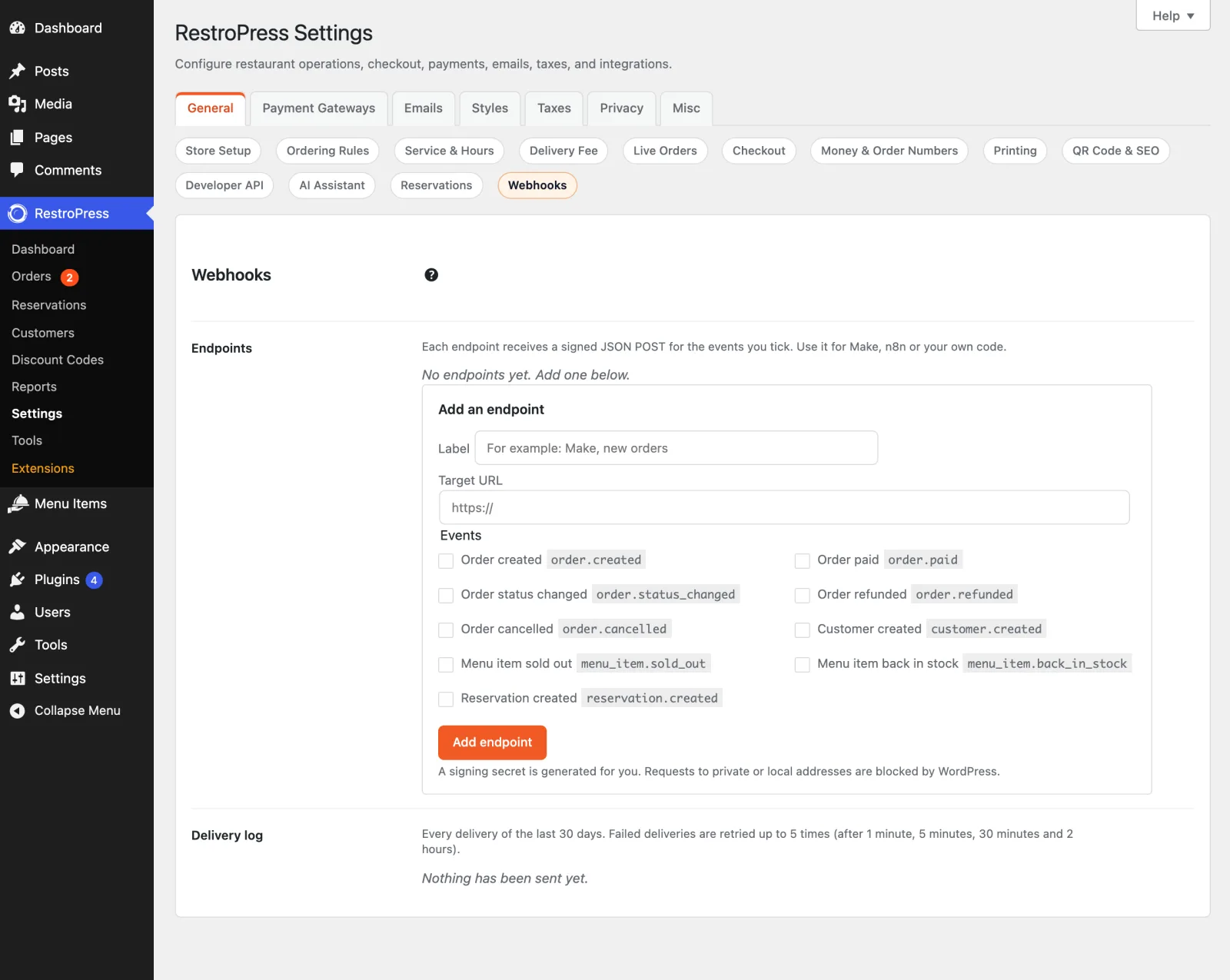
Endpoints have their own buttons and are saved as soon as you click them. You do not need to save the rest of the settings page.
Manage an endpoint#
The endpoint list has the columns Endpoint, Events, Status and Actions.
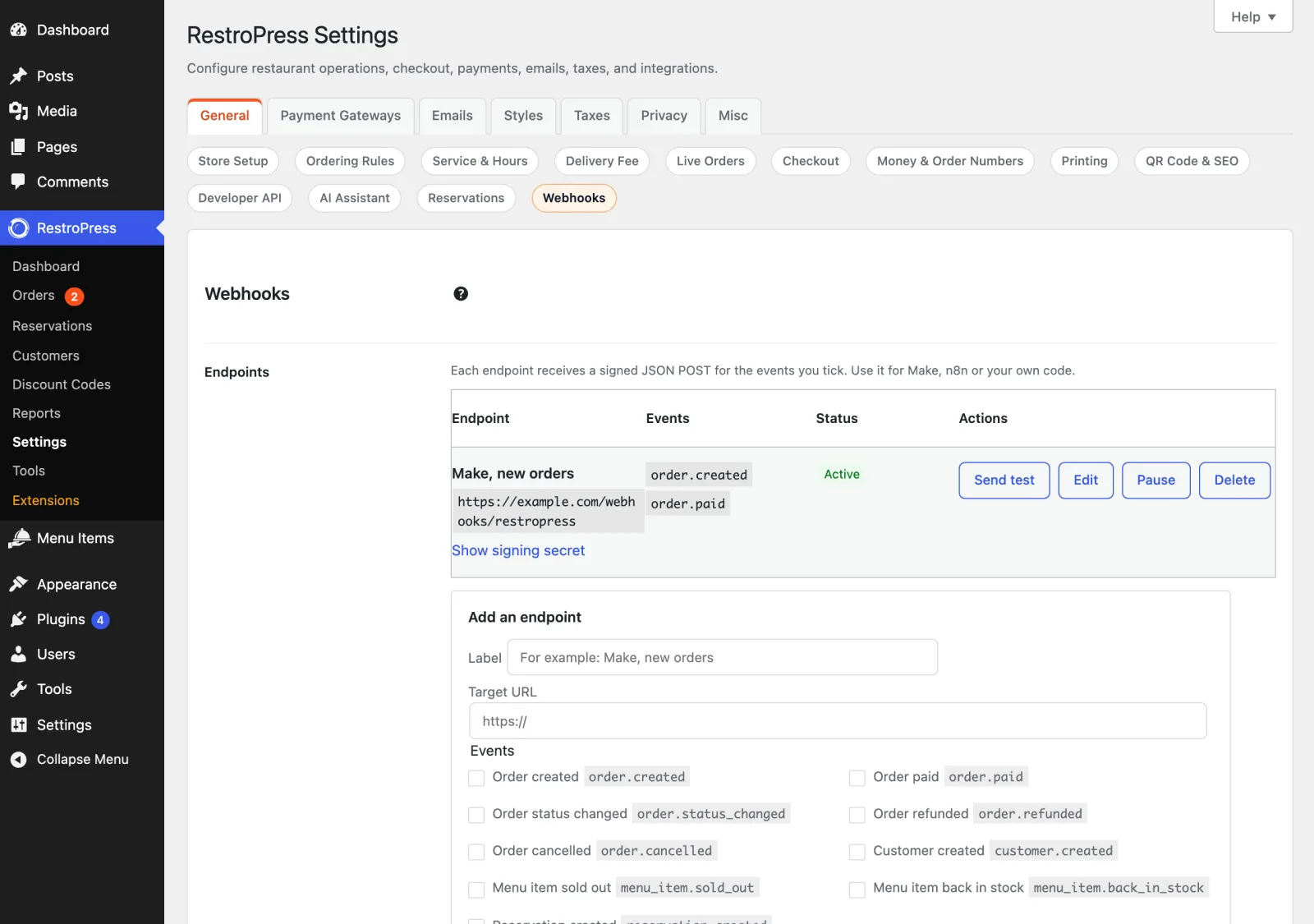
| Button | What it does |
|---|---|
| Send test | Sends a test message (event ping) immediately and shows the result. |
| Edit | Loads the label, URL and events into the form. Change them and click Save endpoint, or click Cancel. The signing secret stays the same. Deliveries already in the queue or log keep the URL they were created with. |
| Pause / Resume | A paused endpoint receives no new events. A queued delivery or retry that comes due while it is paused is marked Failed. Events that happen during the pause are not saved and are not sent after you resume. |
| Delete | Removes the endpoint after you confirm. Deliveries waiting for it are not sent. |
| Show signing secret | Displays the secret with a Copy button. There is no button to change a secret. To get a new one, add a new endpoint, update the receiver, then delete the old endpoint. |
Send test#
Send test does not wait for the background queue. It sends one signed request while you wait, records it in the delivery log, and is never retried automatically. It also works on a paused endpoint. You will see one of these messages:
- "Test delivered. The endpoint answered with HTTP" followed by the status code.
- "Test failed. The endpoint answered with HTTP" followed by the status code.
- "Test failed. Could not connect:" followed by the connection error.
The test checks the connection only. Its data is a short message, not an order. If your automation tool needs to learn the fields of a real event, trigger that event once on a test order.
Events#
The checkbox label and the event key are both shown on the settings screen.
Orders#
| Checkbox | Event key | When it is sent |
|---|---|---|
| Order created | order.created | A new order is stored. For online payments this can be before the payment is confirmed, so the order may never be paid. If a customer goes back and resumes an unfinished checkout, the event can be sent again for the same order. |
| Order paid | order.paid | The payment status changes to Paid. Cash on delivery orders become Paid when the order status is set to Completed, so for them this event comes at the end, not at checkout. |
| Order status changed | order.status_changed | The order status changes, for example from Pending to Accepted (including automatic acceptance). The initial Pending status of a new order does not send it. |
| Order refunded | order.refunded | The payment status changes to Refunded. |
| Order cancelled | order.cancelled | The order status changes to Cancelled. This also happens when the payment is refunded or revoked and the order was not already cancelled. |
One action can produce several events. Cancelling an order sends order.status_changed and order.cancelled. Refunding a payment can send order.refunded, order.status_changed and order.cancelled. Completing a cash on delivery order sends order.paid and order.status_changed. Each is sent only to endpoints that ticked it.
To send new orders to a kitchen or back office system, choose order.created if you want every order as soon as it is stored, or order.paid if you only want paid orders. Remember the cash on delivery timing above.
Customers#
| Checkbox | Event key | When it is sent |
|---|---|---|
| Customer created | customer.created | A new customer record is created. It is not sent when an existing customer (same email address) orders again or is updated. |
Reservations#
| Checkbox | Event key | When it is sent |
|---|---|---|
| Reservation created | reservation.created | A table reservation is stored, whether it comes from your website or is added in the admin area. Later changes, such as confirming or cancelling it, do not send a webhook. |
This checkbox appears only while reservations are enabled (Enable reservations).
Menu items#
| Checkbox | Event key | When it is sent |
|---|---|---|
| Menu item sold out | menu_item.sold_out | A menu item's availability changes to Sold out, for example from the Availability switch in the menu item list or on the edit screen. |
| Menu item back in stock | menu_item.back_in_stock | A sold-out menu item changes back to Available. |
Saving a menu item without changing its availability sends nothing. For developers: these two events follow changes to the rp_stock_status post meta of a fooditem, made through the WordPress meta functions.
Delivery log and resend#
The Delivery log is below the endpoint list on the same screen. It shows 20 deliveries per page, newest first, with Newer and Older buttons. The columns are Time, Event, Sent to, Status, Attempts, HTTP code and Actions.
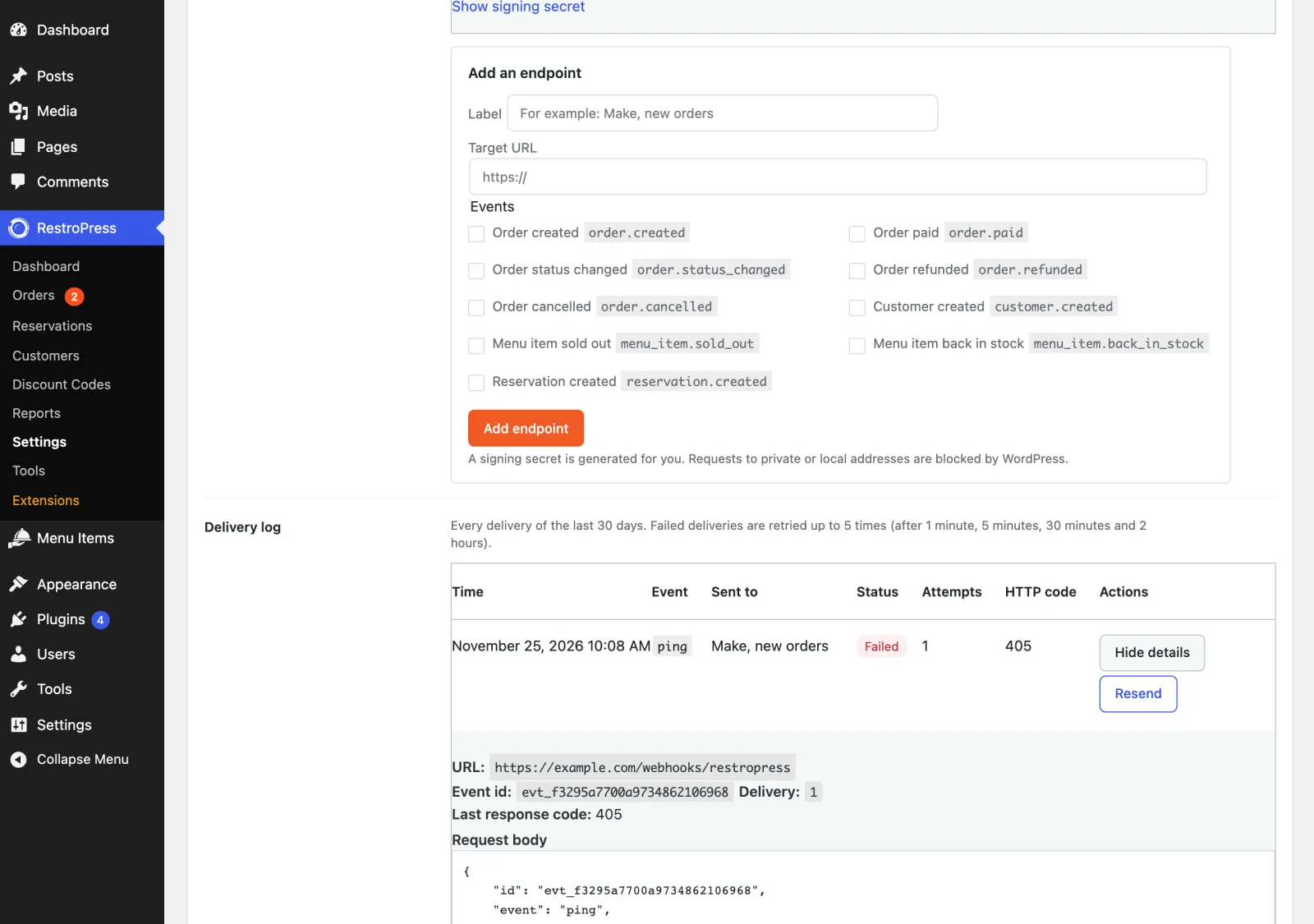
| Status | Meaning |
|---|---|
| Pending | Waiting for its first attempt. |
| Sending | A request is in progress. |
| Retrying | An attempt did not succeed and another is scheduled, or an interrupted send has been put back in the queue. |
| Delivered | The receiver answered with a 2xx status code. |
| Failed | No further automatic attempts will be made. |
Details shows the URL, Event id, Delivery number, Last response code, Next attempt (for pending and retrying deliveries), the Request body and the first 1000 characters of the response, or the connection error. Click Hide details to close it.
Resend queues a new copy of the delivery. It has a new delivery number but the same event id, and uses the same request body if one was already built. It goes to the URL recorded on the original delivery, even if you have since edited the endpoint, and is signed with the endpoint's secret. It goes through the background queue with the normal retry schedule. Resending is not possible if the endpoint was deleted, and the copy fails without being sent if the endpoint is paused. To send to a corrected URL, resend will not help: trigger the event again.
A receiver that skips event ids it has already processed will also skip a resend of one of them.
Log entries are kept for 30 days and removed by a daily task. Request bodies can contain customer names, email addresses, phone numbers and delivery addresses, so take this into account in your privacy policy, both for the log and for the system receiving the data. If RestroPress removes its data on uninstall, the log table and the endpoints are removed too.
Retries and success codes#
- Only a status code from 200 to 299 counts as delivered.
- Redirects are not followed. A 3xx answer is a failure, so enter the final URL.
- RestroPress waits up to 10 seconds for a response.
- Each queued delivery is attempted up to 5 times in total.
| After failed attempt | Earliest next attempt |
|---|---|
| 1 | 1 minute later |
| 2 | 5 minutes later |
| 3 | 30 minutes later |
| 4 | 2 hours later |
| 5 | None. The delivery is marked Failed. |
An endpoint is never paused or deleted automatically, however many deliveries fail. All error codes, including 410, are retried for endpoints added on this screen. Check the delivery log from time to time. After fixing a problem, use Resend for the failed deliveries.
Background sending and WP-Cron#
The checkout, order update or menu edit that causes an event does not contact your receiver. It adds the delivery to a queue, and a WP-Cron task named rpress_webhooks_process_queue sends it. (Send test is the exception.)
WP-Cron normally runs only when someone visits the site, so on a quiet site deliveries and retries can be late. The times in the retry table are the earliest possible times. For predictable delivery, ask your host to set up a real server cron job that calls wp-cron.php every minute. This is required if DISABLE_WP_CRON is set in your site's configuration. For example:
* * * * * curl -s "https://example.com/wp-cron.php?doing_wp_cron" > /dev/nullOne run sends up to 25 deliveries and stops starting new ones after about 40 seconds. The rest wait for the next run. A delivery left in Sending for more than 5 minutes is returned to the queue the next time the task runs, so the receiver may get it twice.
The request body is built at the first attempt, not at the moment the event happens, and is then reused for retries and resends. If sending is delayed, the record in the body can show a later state. For example, the body of an order.created event might already show the order as paid or accepted. If the record has been deleted before the first attempt, the delivery is marked Failed.
URL rules#
When you save an endpoint, the Target URL must:
- use
httporhttpsand include a host name; - not contain a user name or password in the address;
- not contain spaces, quotes or angle brackets, and be no longer than 2000 characters;
- be a URL that WordPress can store without altering it. Percent-encode special characters.
When a request is sent, WordPress's safe HTTP rules also apply. In general, hosts that do not resolve and private, local or reserved network addresses are blocked, and the only ports allowed for another host are 80, 443 and 8080. The exact rules depend on your WordPress version. A URL can therefore save successfully and still fail when sent. The error "WordPress blocked the request: the host does not resolve, or it is a private or local address." can also appear when the port is not allowed. For a self-hosted tool that listens on another port, put it behind a public HTTPS address on port 443. A developer can adjust the WordPress rules with the core filters http_allowed_safe_ports and http_request_host_is_external; allow only the specific host or port you trust.
For HTTPS addresses, the certificate is verified, so a self-signed or expired certificate normally causes a connection error.
Request format#
Each delivery is an HTTP POST with a JSON body. RestroPress sets these headers (the HTTP library also adds standard ones such as the host and content length). Header names are not case-sensitive.
| Header | Value |
|---|---|
Content-Type | application/json |
User-Agent | RestroPress-Webhooks/ followed by the RestroPress version, for example RestroPress-Webhooks/3.5.1 |
X-RP-Webhook-Event | The event key, such as order.paid or ping |
X-RP-Webhook-Id | The event id, the same value as id in the body |
X-RP-Webhook-Delivery | The delivery number in the log. Retries of one delivery keep it; a resend, or a delivery to another endpoint, has a different number. |
X-RP-Webhook-Timestamp | Unix time in seconds of this attempt |
X-RP-Webhook-Signature | sha256= followed by a lower-case hexadecimal HMAC |
Envelope#
Every body has the same outer fields.
| Field | Type | Meaning |
|---|---|---|
id | string | Event id, starting evt_. It is the same for all endpoints receiving the event, and for retries and resends. |
event | string | Event key, or ping |
api_version | string | Payload schema version, "1" |
created_at | string | When the event happened, ISO 8601 UTC |
site_url | string | Home URL of the sending site |
test | boolean | true for Send test and for samples generated in code. Real events are false, including orders paid with a payment gateway in test mode. |
data | object | Contains one object named order, customer, reservation or menu_item. order.status_changed also has previous_status and status. A ping has only message. |
The examples below use made-up values and are formatted for reading. The real body is compact JSON, in which forward slashes and non-ASCII characters can appear escaped (for example https:\/\/example.com\/). Any JSON parser handles this.
Order#
All order events carry this object.
{
    "id": "evt_c11edfa535bb7b4d79725cae",
    "event": "order.created",
    "api_version": "1",
    "created_at": "2026-01-15T18:05:00Z",
    "site_url": "https://example.com/",
    "test": false,
    "data": {
        "order": {
            "id": 1042,
            "number": "1042",
            "payment_status": "pending",
            "order_status": "pending",
            "order_status_label": "Pending",
            "service_type": "delivery",
            "service_date": "2026-01-15",
            "service_time": "7:30pm",
            "currency": "USD",
            "subtotal": 25.5,
            "tax": 2.04,
            "fees_total": 3,
            "discount_codes": [
                "WELCOME10"
            ],
            "total": 27.99,
            "gateway": "cash_on_delivery",
            "note": "Ring the bell twice",
            "customer": {
                "id": 12,
                "user_id": 0,
                "email": "alex@example.com",
                "first_name": "Alex",
                "last_name": "Sample",
                "phone": "+1 555 0100"
            },
            "delivery_address": {
                "address": "12 Sample Street",
                "flat": "Apt 4",
                "city": "Springfield",
                "postcode": "12345"
            },
            "items": [
                {
                    "id": 215,
                    "name": "Margherita Pizza",
                    "variation": "Large",
                    "quantity": 2,
                    "unit_price": 11.5,
                    "line_total": 25.5,
                    "instruction": "Well done",
                    "addons": [
                        {
                            "id": 31,
                            "name": "Extra cheese",
                            "quantity": 2,
                            "price": 1.25
                        }
                    ]
                }
            ],
            "date_created": "2026-01-15T18:05:00Z",
            "date_completed": null
        }
    }
}- Money values are JSON numbers rounded to two decimal places. Whole amounts can appear without decimals.
payment_statusis the payment state, such aspending,processing,paid,refunded,failedorabandoned.order_statusis the fulfilment state. The standard values arepending,accepted,processing,ready,transit(Out for delivery),completedandcancelled. Extensions or custom code can add values, so ignore ones you do not recognise.service_dateandservice_timeare the text saved with the order. Do not assume a fixed time format.date_createdanddate_completedare ISO 8601 UTC;date_completedisnullwhen the order has no completion date.delivery_addressisnullwhen no address is saved with the order.customer.user_idis0when there is no linked user account. Text fields can be empty strings.discount_codesandaddonsare empty arrays when there are none.gatewayis the payment method id.- The order object does not include the purchase key or the customer's IP address.
For order.status_changed, data has two extra fields recorded when the change happened. previous_status can be null when RestroPress had not recorded an earlier status, for example on the first change of an order that existed before webhooks. Use these two fields for the transition: data.order.order_status can already be newer. The order object is shortened here.
{
    "id": "evt_db35a9b774f40048154238d5",
    "event": "order.status_changed",
    "api_version": "1",
    "created_at": "2026-01-15T18:05:00Z",
    "site_url": "https://example.com/",
    "test": false,
    "data": {
        "previous_status": "pending",
        "status": "accepted",
        "order": {
            "id": 1042,
            "number": "1042",
            "order_status": "accepted",
            "order_status_label": "Accepted",
            "...": "all other order fields"
        }
    }
}Customer#
{
    "id": "evt_35fa8c2f2981c349a111677d",
    "event": "customer.created",
    "api_version": "1",
    "created_at": "2026-01-15T18:05:00Z",
    "site_url": "https://example.com/",
    "test": false,
    "data": {
        "customer": {
            "id": 12,
            "user_id": 0,
            "email": "alex@example.com",
            "name": "Alex Sample",
            "purchase_count": 3,
            "purchase_value": 86.4,
            "date_created": "2026-01-15T18:05:00Z"
        }
    }
}Reservation#
status is normally pending, confirmed, declined, cancelled or completed. date is the booking date and time is the booked date and time in UTC. Convert it to the restaurant's time zone before showing it.
{
    "id": "evt_82d787093313d59259f1a771",
    "event": "reservation.created",
    "api_version": "1",
    "created_at": "2026-01-15T18:05:00Z",
    "site_url": "https://example.com/",
    "test": false,
    "data": {
        "reservation": {
            "id": 3301,
            "status": "pending",
            "date": "2026-01-20",
            "time": "2026-01-20T19:30:00Z",
            "party": 4,
            "name": "Alex Sample",
            "phone": "+1 555 0100",
            "email": "alex@example.com",
            "note": "Window table if possible"
        }
    }
}
Menu item#
Both menu item events use this object. stock_status is available or unavailable. price is a single number; the object does not list a price for each size. sku can be empty.
{
    "id": "evt_823279be60257c51903c29c5",
    "event": "menu_item.sold_out",
    "api_version": "1",
    "created_at": "2026-01-15T18:05:00Z",
    "site_url": "https://example.com/",
    "test": false,
    "data": {
        "menu_item": {
            "id": 215,
            "name": "Margherita Pizza",
            "sku": "PIZ-MARG",
            "price": 11.5,
            "stock_status": "unavailable",
            "permalink": "https://example.com/fooditem/margherita-pizza/",
            "categories": [
                "Pizza"
            ]
        }
    }
}
Test message#
{
    "id": "evt_000000000000000000000001",
    "event": "ping",
    "api_version": "1",
    "created_at": "2026-01-15T18:05:00Z",
    "site_url": "https://example.com/",
    "test": true,
    "data": {
        "message": "Test delivery from RestroPress Webhooks. If you can read this, the endpoint works."
    }
}
Verify the signature#
The signature is an HMAC SHA-256 of the timestamp, a full stop, and the raw request body, using the endpoint's signing secret as the key:
signature = "sha256=" + hex( HMAC_SHA256( secret, timestamp + "." + raw_body ) )timestampis the exact value ofX-RP-Webhook-Timestamp.raw_bodyis the request body exactly as received. Do not decode and re-encode the JSON first, because the bytes will differ and the check will fail.- Use the whole secret as text, including the
whsec_prefix. Do not hex-decode it. - Compare with a constant-time function.
Each attempt gets a new timestamp and signature. Rejecting old timestamps limits how long a captured request can be reused. The examples allow a difference of 300 seconds. That limit is the receiver's choice, not a RestroPress setting, and needs the server clocks to be accurate. Both examples read the secret from an environment variable named RP_WEBHOOK_SECRET.
PHP#
<?php
function rp_webhook_is_valid( $body, $timestamp, $signature, $secret, $tolerance = 300 ) {
	if ( '' === $secret || ! ctype_digit( $timestamp ) ) {
		return false;
	}
	if ( abs( time() - (int) $timestamp ) > $tolerance ) {
		return false;
	}
	$expected = 'sha256=' . hash_hmac( 'sha256', $timestamp . '.' . $body, $secret );
	return hash_equals( $expected, $signature );
}

$body = file_get_contents( 'php://input' ); // Raw bytes, before any JSON decoding.
$ok   = rp_webhook_is_valid(
	$body,
	$_SERVER['HTTP_X_RP_WEBHOOK_TIMESTAMP'] ?? '',
	$_SERVER['HTTP_X_RP_WEBHOOK_SIGNATURE'] ?? '',
	(string) getenv( 'RP_WEBHOOK_SECRET' )
);
if ( ! $ok ) {
	http_response_code( 401 );
	exit;
}
$event = json_decode( $body, true );
// Save $event to your own queue here, skipping any $event['id'] you have already handled.
http_response_code( 204 );Node.js#
This uses only built-in modules and listens on port 3000. Put it behind a web server or proxy that provides public HTTPS. If you use a framework, make sure you get the raw body for this route, before any JSON middleware changes it. In production, also limit the size of request bodies you accept.
const http = require('node:http');
const crypto = require('node:crypto');

const secret = process.env.RP_WEBHOOK_SECRET;

function isValid(rawBody, timestamp, signature, secret, tolerance = 300) {
  if (!secret || !/^\d+$/.test(timestamp)) return false;
  if (Math.abs(Date.now() / 1000 - Number(timestamp)) > tolerance) return false;
  const expected = Buffer.from('sha256=' + crypto
    .createHmac('sha256', secret)
    .update(timestamp + '.')
    .update(rawBody)
    .digest('hex'));
  const received = Buffer.from(signature);
  return expected.length === received.length &&
    crypto.timingSafeEqual(expected, received);
}

http.createServer((req, res) => {
  const chunks = [];
  req.on('data', (chunk) => chunks.push(chunk));
  req.on('end', () => {
    const rawBody = Buffer.concat(chunks); // Raw bytes, before JSON.parse.
    const ok = req.method === 'POST' && isValid(
      rawBody,
      String(req.headers['x-rp-webhook-timestamp'] || ''),
      String(req.headers['x-rp-webhook-signature'] || ''),
      secret
    );
    if (!ok) {
      res.writeHead(401).end();
      return;
    }
    const event = JSON.parse(rawBody.toString('utf8'));
    // Save event to your own queue here, skipping any event.id you have already handled.
    res.writeHead(204).end();
  });
}).listen(3000);
Security and reliability#
- Use HTTPS. RestroPress accepts
httpaddresses, but the body, which can contain customer details, is then sent unencrypted. - Verify every request before acting on it. Do not rely on the User-Agent or other headers to identify the sender. The signature covers the timestamp and body, not the other headers, so read the event key and id from the verified body.
- Keep the signing secret private. Use a separate endpoint, and so a separate secret, for each receiving system.
- Handle duplicates. The same event can arrive more than once: after a timeout where your system did process it, after an interrupted send, or after a resend. Store the
idof each event you have processed successfully and skip repeats. If two endpoints on the same system subscribe to the same event, both get the sameid. A repeatedorder.createdfrom a resumed checkout has a newid, so also match ondata.order.idwhen creating records. - Do not rely on order of arrival. Retries mean an older event can arrive after a newer one. Compare
created_atand avoid overwriting newer data with older data. - Answer quickly. Save the event, return a 2xx status within 10 seconds, and do slow work afterwards. Do not return 2xx if you could not save it.
Troubleshooting#
| Problem | What to check |
|---|---|
| Deliveries stay Pending or are late | WP-Cron. See Background sending and WP-Cron above. |
| Nothing appears in the log | The endpoint must be Active and have the event ticked when the event happens. For order.paid on cash on delivery, the order must reach Completed. |
| HTTP code 301 or 302 | Enter the final address. Redirects are not followed. |
| HTTP code 401 or 403 | The receiver refused the request. Check the signing secret, that the receiver verifies the raw body, its clock, and any firewall in front of it. |
| No HTTP code | Open Details and read the connection error. Check URL rules, the certificate, and whether the receiver answers within 10 seconds. |
| "Not sent: the target is paused." | Resume the endpoint, then resend. |
| "Not sent: the target was deleted or the extension that owns it is inactive." | The endpoint no longer exists, or the extension that created the delivery is not active. |
Developer reference#
These additions are new in 3.5.1. RPRESS_WEBHOOKS_API_VERSION (1.0) is the version of the PHP API and is separate from the payload's api_version. There is no filter in 3.5.1 for adding event keys or changing the payload.
Filters and cron hook#
| Name | Arguments | Purpose |
|---|---|---|
rpress_webhooks_request_timeout | $timeout (10), $url | Seconds to wait for a receiver, minimum 1. A long timeout slows the queue. |
rpress_webhooks_batch_size | $batch (25) | Maximum deliveries in one worker run |
rpress_webhooks_log_retention_days | $days (30) | Days a delivery stays in the log, minimum 1. The note on the settings screen still says 30 days. |
rpress_webhooks_process_queue | none | WP-Cron action that runs the delivery worker |
Functions#
| Function | Returns |
|---|---|
rpress_webhooks_events() | Array of event key to label. Includes reservation.created only while reservations are enabled. |
rpress_webhooks_event_resource( $event ) | order, customer, reservation, menu_item, or an empty string |
rpress_webhooks_samples( $event ) | Up to three envelopes built from recent records, or one built-in sample if none can be used. Empty array for an unknown event or ping. All have test set to true, but samples built from recent records contain real store and customer data. |
rpress_webhooks_build_payload( $event, $object_id, $extra = array() ) | The envelope array, or a WP_Error. $extra accepts id, created_at (Unix time), test and, for status changes, previous_status and status. ping is accepted. |
rpress_webhooks_get_resource( $type, $object_id ) | The resource object used in payloads, or null |
rpress_webhooks_sign( $secret, $timestamp, $body ) | The hexadecimal HMAC, without the sha256= prefix |
rpress_webhooks_clean_url( $url ) | The URL if it passes the rules for saving, otherwise an empty string. It does not check the network rules applied at send time. |
rpress_webhooks_generate_secret() | A new random secret starting whsec_ |
rpress_webhooks_iso( $timestamp ) | ISO 8601 UTC string, or null for an empty timestamp |
rpress_webhooks_retry_delay( $attempt ) | Seconds to wait after that failed attempt, or 0 when there is no further attempt |
rpress_webhooks_max_attempts() | 5 |
rpress_webhooks_register_target_type( $type, $args ) | true or a WP_Error |
rpress_webhooks_get_target_types() | All registered target types, with endpoint first |
Add your own delivery target type#
An extension can manage its own subscribers and deliver to them through the same queue, signature, retries, log and resend by calling rpress_webhooks_register_target_type(). The events and payloads are the same. The type key must be 2 to 20 characters, start with a lower-case letter, contain only lower-case letters, digits and underscores, and not be endpoint or already registered.
| Argument | Required | Description |
|---|---|---|
label | Yes | Name shown with the URL in the delivery log |
targets | Yes | Callable that receives the event key and returns a list of arrays with id (at most 32 characters), url and label. Targets with a missing or too long id, or a URL that fails the saving rules, are skipped. |
resolve | Yes | Callable that receives a target id and returns an array with secret (not empty) and active, or false. If active is omitted the target is treated as active. |
gone | No | Callable that receives a target id. When set, an HTTP 410 answer calls it and the delivery is marked Failed without a retry. |
The registration lasts for the current request only, so register on every request, including cron requests. If your extension is deactivated, its waiting deliveries are marked Failed when they come due.
add_action( 'init', function () {
	if ( ! function_exists( 'rpress_webhooks_register_target_type' ) ) {
		return;
	}
	rpress_webhooks_register_target_type(
		'myplugin',
		array(
			'label'   => 'My Plugin',
			'targets' => function ( $event ) {
				$url = get_option( 'myplugin_webhook_url' );
				if ( 'order.paid' !== $event || ! $url ) {
					return array();
				}
				return array(
					array( 'id' => 'main', 'url' => $url, 'label' => 'Main receiver' ),
				);
			},
			'resolve' => function ( $id ) {
				$secret = get_option( 'myplugin_webhook_secret' ); // Create with rpress_webhooks_generate_secret().
				if ( 'main' !== $id || ! $secret ) {
					return false;
				}
				return array( 'secret' => $secret, 'active' => true );
			},
		)
	);
} );