
Mollie Payment Gateway
On this page
RestroPress Mollie adds Mollie payment methods to your checkout. Each method (iDEAL, Bancontact, credit card, PayPal and others) is a separate gateway that you switch on individually. The customer is redirected to Mollie's hosted payment page, pays there, and returns to your site. It is for restaurants that have a Mollie account.
Requirements#
- RestroPress, active. The extension does nothing if RestroPress is not loaded. No minimum RestroPress version is checked.
- PHP 5.6 or later (checked in the plugin; the readme states PHP 5.4) and WordPress 4.0 or later (from
readme.txt). - A Mollie account with API keys, and the payment methods you want activated in your Mollie profile.
- Your site must be reachable from the internet, because Mollie calls a webhook URL on your site to confirm payments.
Installation#
- In WordPress go to Plugins › Add New › Upload Plugin, choose the ZIP file and install it.
- Activate RestroPress - Mollie Payment Gateway.
- Open RestroPress › Settings › Payment Gateways › Mollie and enter your API keys.
- Enable the methods you want (see Settings), then go to the General section of the same tab, tick those methods in the list of gateways, and save.
The plugin has no licence key field, so there is nothing to enter under RestroPress › Settings › Licenses for it.
Provider account steps#
- In the Mollie Dashboard open Developers › API keys and copy the test key (starts with
test_) and the live key (starts withlive_). Keys must be at least 30 characters long after the prefix and contain only letters, digits and underscores. - In your Mollie profile activate each payment method you plan to use. A method that is not active in the profile is shown as "Disabled - Enable in your Mollie profile first." in the plugin's method list.
- No webhook has to be added by hand. For every payment the plugin sends Mollie a webhook URL of the form
https://your-site.com/?rpress-listener=mollie_ideal&order-id=ID&order-key=KEY(the listener value is the method's ID) and a return URL on your success page.
Settings#
Found under RestroPress › Settings › Payment Gateways › Mollie. The first screen holds the settings shared by all methods, followed by a table of methods. Click a method's name, Manage or Set up to open its own settings; use the link beside its title to return.
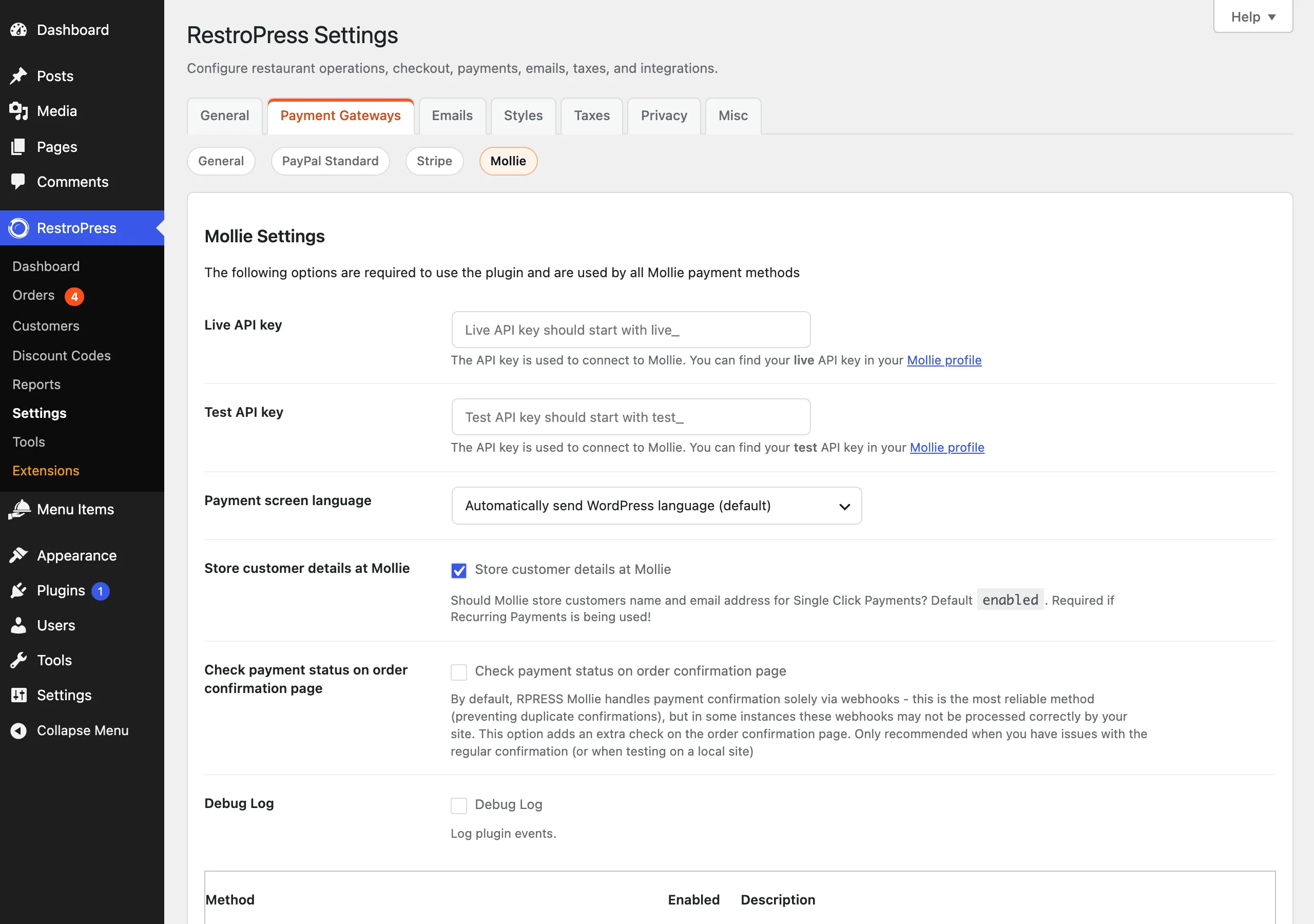
Shared settings (Mollie Settings)#
| Setting | What it does | Default |
|---|---|---|
| Live API key | Mollie live key, must start with live_. Used when RestroPress Test Mode is off. | Empty |
| Test API key | Mollie test key, must start with test_. Used while RestroPress Test Mode is on. | Empty |
| Payment screen language | Language of Mollie's payment page. Automatically send WordPress language (also follows WPML), Detect using browser language, or one fixed locale from the list (English, Dutch, Flemish, French, French (Belgium), German, Austrian German, Swiss German, Spanish, Catalan, Portuguese, Italian, Norwegian, Swedish, Finnish, Danish, Icelandic, Hungarian, Polish, Latvian, Lithuanian). Falls back to American English. | Automatically send WordPress language |
| Store customer details at Mollie | Lets Mollie keep the customer's name and email for single-click payments. The setting's help text says it is required if recurring payments are used. | On |
| Check payment status on order confirmation page | Adds a payment-status check when the customer returns. By default the order is confirmed only by the webhook. Turn this on if webhooks do not reach your site (for example on a local site). | Off |
| Debug Log | Writes plugin events to the RestroPress gateway error log (RestroPress › Reports › Logs › Gateway Errors). | Off |
Test mode is the main RestroPress Test Mode option. Every new payment remembers which mode it was created in, so a refund or status check later uses the matching key.
Per-method settings#
Every method has these three fields:
| Setting | What it does | Default |
|---|---|---|
| Enable/Disable | "Enable ..." turns the method on in the plugin. The method still has to be ticked in the General gateways list to appear at checkout. | Off |
| Title | The name customers see at checkout. | The method's default name |
| Description | Text shown with the method. | The method's default description |
Bank Transfer and SEPA Direct Debit also have Initial order status (Processing, default, or Pending), for payments that take days to confirm. Bank Transfer additionally has:
| Setting | What it does | Default |
|---|---|---|
| Expiry date | Days until the transfer expires (1 to 100). Sent to Mollie as the due date. A daily task also sets orders still in the initial status after this many weekdays to Abandoned. | 12 |
| Skip Mollie payment screen | Sends the customer straight to your order-received page with transfer instructions, instead of to Mollie. | Off |
Methods in the plugin#
Apple Pay, Bancontact, Bank Transfer, Belfius Direct Net, Credit card, SEPA Direct Debit, EPS, Gift cards, Giropay, iDEAL, ING Home'Pay, KBC/CBC Payment Button, MyBank, PayPal, paysafecard, Przelewy24 and SOFORT Banking. SEPA Direct Debit is only meant for recurring payments and is never shown at checkout.
How it works#
- At checkout the customer sees only the methods that are enabled in the plugin, ticked in RestroPress, and available from Mollie for the current cart. The plugin asks Mollie which methods apply to the order total, store currency and language, and hides the rest. No card or bank fields are shown on your page. Customers choose their bank or enter card details on Mollie's page.
- On submit the plugin creates the order with status Pending, then creates the payment in Mollie. The description is "Order" followed by the order number. The Mollie payment ID is stored as the transaction ID, and the note "Method payment started (ID)" is added.
- The customer is redirected to Mollie to pay.
- Mollie calls the webhook. The plugin checks the order key and that the payment ID matches the order, loads the payment from Mollie, and sets the order to Completed when it is paid. Failed, expired or cancelled payments are handled with notes on the order.
- When the customer returns: a cancelled payment sends them back to checkout, a failed or expired one to the failed-payment page, and anything else (paid, open, pending) to the success page. While an order is not yet confirmed, the receipt page checks the status in the background and refreshes it.
Refunds#
All methods except paysafecard declare refund support. Open the order, choose Refunded in the status dropdown, tick Refund Charge in Mollie, and update. The plugin refunds the full payment amount in Mollie and adds a note with the payment and refund IDs. Without the checkbox only the RestroPress status changes. Refunds made in the Mollie Dashboard are picked up the next time Mollie sends a webhook for that payment: a refund equal to the order total sets the order to Refunded, a smaller one adds a note.
The transaction ID on the order links to the payment in the Mollie Dashboard.
Currencies#
Each method checks the store currency against a list in the code and shows an error on its settings screen if it is not in it: AUD, BGN, BRL, CAD, CHF, CZK, DKK, EUR, GBP, HKD, HRK, HUF, ILS, ISK, JPY, MXN, MYR, NOK, NZD, PHP, PLN, RON, RUB, SEK, SGD, THB, TWD, USD. The list can be changed with the filter rpress_{method id}_supported_currencies. Which currency each Mollie method accepts is decided by Mollie.
Developer reference#
| Hook | Type | Parameters | Purpose |
|---|---|---|---|
rpress_mollie_{method id}_args | filter | $paymentRequestData, $order, $gateway | Change the data sent to Mollie when creating a payment, e.g. rpress_mollie_mollie_ideal_args. |
rpress_mollie_payment_created | action | $payment_object, $order | After the Mollie payment exists. |
rpress_mollie_order_paid | action | $payment_object, $order | Just before the order is completed. |
rpress_mollie_create_refund | action | $payment_object, $order | Before a refund is sent to Mollie. |
rpress_mollie_refunds_processed | action | $payment, $order | After refunds made in Mollie were synced. |
rpress_mollie_return_url, rpress_mollie_webhook_url | filter | $url, $order | Change the return or webhook URL. |
rpress_mollie_send_to_success_page, rpress_mollie_send_to_failed_page | filter | $redirect, $args | Change the redirect after returning from Mollie. |
rpress_mollie_api_endpoint | filter | $endpoint | Change the Mollie API base URL. |
mollie_api_key_filter | filter | $api_key | Change the API key used. |
rpress_mollie_gateway_title, rpress_mollie_gateway_description, rpress_mollie_gateway_icon | filter | value, $gateway_id | Change the checkout title, description or icon. |
rpress_{method id}_supported_currencies | filter | $currencies | Change the allowed currencies for a method. |
Example: add a custom description to every iDEAL payment in Mollie.
add_filter( 'rpress_mollie_mollie_ideal_args', function ( $args, $order ) {
    $args['description'] = 'My Restaurant order ' . $order->ID;
    return $args;
}, 10, 2 );
The plugin also registers the AJAX actions rpress_mollie_toggle_gateway_enabled (admin) and rpress_mollie_receipt_ajax_status (checks an order's status for the receipt page).
Troubleshooting#
- "No API key provided. Please set you Mollie API key first." The key for the current mode is empty. The message "Invalid API key(s)" means the key does not match
live_ortest_followed by at least 30 word characters. - A method is greyed out as "Disabled - Enable in your Mollie profile first." It is not activated in your Mollie profile.
- "Current shop currency ... not supported by Mollie." Your store currency is not in the plugin's list for that method.
- A method does not appear at checkout. It must be enabled on its own screen, ticked in the General gateways list, and returned by Mollie as available for the cart total, currency and language. Very low or high totals can remove a method.
- Orders stay Pending after payment. Mollie could not reach the webhook (firewall, maintenance mode, password-protected or local site). Turn on Check payment status on order confirmation page as a workaround, and enable Debug Log to see what arrives.
- "Could not create ... payment." Mollie rejected the request; details are in the Debug Log.
Changelog highlights#
- 1.0.3. Avoids duplicate dependency loading that could cause fatal errors; better compatibility with other RestroPress extensions; sanitised settings and request parameters; stricter webhook validation (listener, order key, payment ID); translations loaded later to avoid early-load warnings.
- 1.0.2. Fixed a fatal error.
- 1.0.1. Fixed the cart not being cleared after payment.