
RestroPress DineIn
On this page
DineIn lets guests order from their table. You print a QR code for each table; the guest scans it and opens a mobile web app (a Flutter build served from a WordPress page) showing your menu. They can place and add to an order, call a waiter, ask for the bill and, depending on your setup, pay. Orders arrive in RestroPress as normal orders with the service type "Dinein", and waiters can be notified by push notification on the waiter app.
It is for restaurants and cafes that want table ordering without printing menus or hiring extra floor staff. The extension supplies the guest app, the table QR generator, the REST API the apps use, and a Waiter user role.
Requirements#
- RestroPress (free plugin) active. Without it the extension shows an error notice and deactivates itself.
- A valid extension licence. Every DineIn REST route first checks that the option
rpress_dinein_license_statusequalsvalid; if not, the app receives an error and cannot load the menu or place orders. - For push notifications to waiters and order tracking: a Firebase project with a service account (see Firebase Setup below).
- Optional, per payment method: a Stripe, PayPal or Square gateway configured in RestroPress; Paytm merchant credentials; or a UPI ID.
- The plugin header sets no minimum WordPress or PHP version; the readme states WordPress 4.0 and PHP 5.4 as minimums.
Installation#
- Go to Plugins › Add New › Upload Plugin, choose the extension ZIP and click Install Now, then Activate.
- Open RestroPress › Extensions, find the DineIn card, enter your licence key and click Activate License. An active licence also enables updates.
- Open RestroPress › Settings › Dine In and complete the settings below.
On activation the plugin: creates the folder wp-content/uploads/rpress-dine-in/qr-codes; copies its templates folder into the templates folder of your active theme (switching theme or updating the plugin repeats this); and, if it has not done so before, creates a published page titled "DineIn" that uses the DineIn page template. Select that page in the DineIn page setting. Make sure your theme folder is writable by the web server.
Settings#
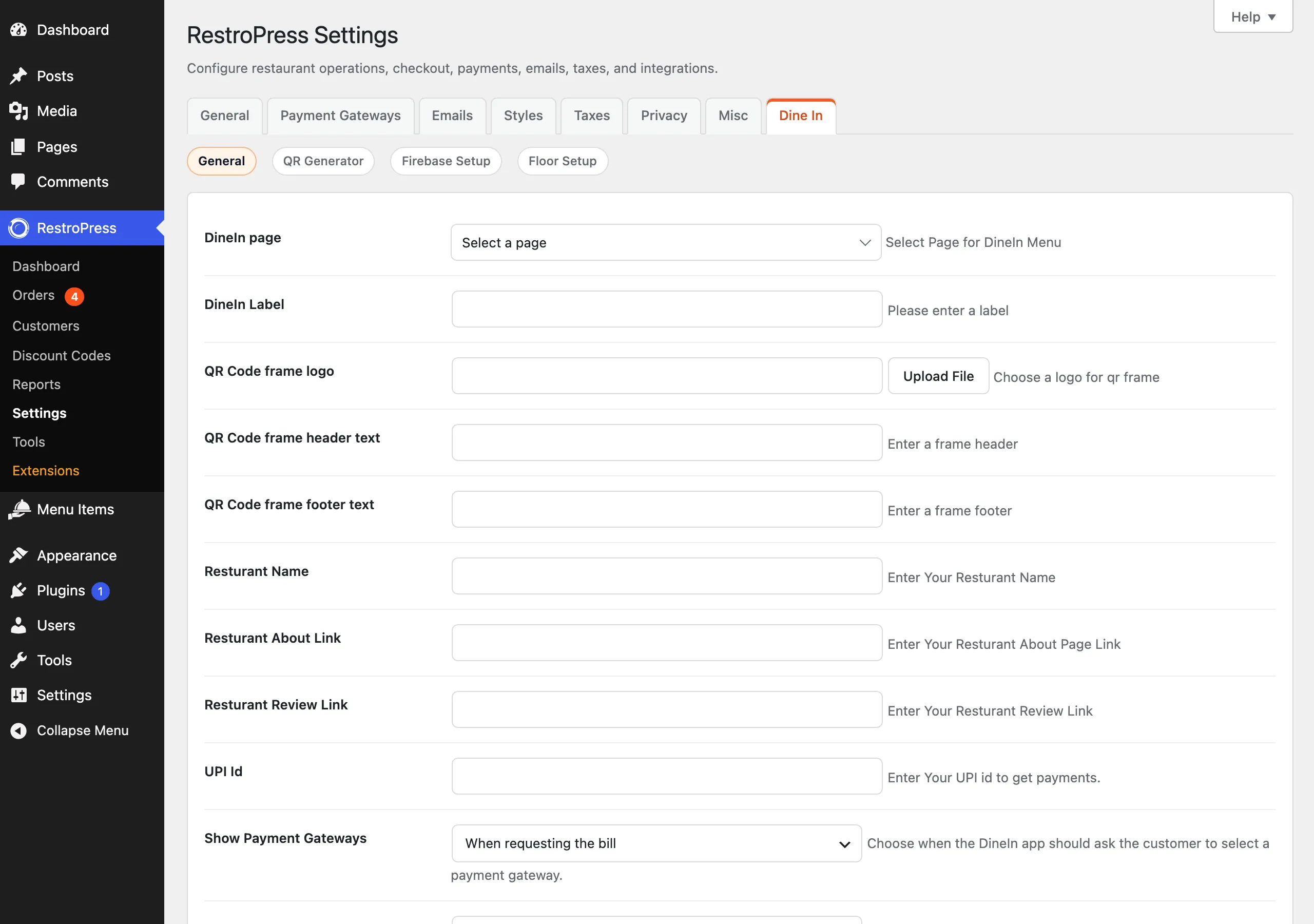
Settings are under RestroPress › Settings › Dine In (admin.php?page=rpress-settings&tab=dinein) in four sections: General, QR Generator, Firebase Setup and Floor Setup.
General#
| Setting | What it does | Default |
|---|---|---|
| DineIn page | The page that hosts the guest app. QR codes point to this page's address. | None. Select the page created on activation. |
| DineIn Label | A label for DineIn (stored as dinein_label). | Empty |
| QR Code frame logo | Logo shown in the printable QR frame in the QR Generator. | None |
| QR Code frame header text / QR Code frame footer text | Text above and below the QR code in the frame. | Empty |
| Resturant Name | Your restaurant name (spelled this way in the settings). | Empty |
| Resturant About Link / Resturant Review Link | Links to your About page and review page. | Empty |
| UPI Id | Your UPI ID. When set, UPI payment options (PhonePe, Google Pay, Paytm, generic UPI) become available in the app. | Empty |
| Show Payment Gateways | Whether the app asks for a payment method Before placing an order or When requesting the bill. | When requesting the bill |
| PayPal Currency | Currency used when DineIn creates PayPal orders. | USD |
| Paytm Environment | Staging/Test or Production/Live. | Staging/Test |
| Paytm Merchant ID, Paytm Merchant Key | Paytm credentials; the key is used for checksums. With both set, the Paytm payment gateway option is offered. | Empty |
| Paytm Website Name | Use WEBSTAGING for test or DEFAULT for production unless Paytm gave you another value. | WEBSTAGING |
| Main Screen Logo / Loading Screen Logo | Images for the app's main screen and loading screen. The loading logo is also used as the page icon. | None |
| Logo Color | Colour of the loader. | #9E1B10 in the page template |
| Enable call waiter | Shows a call-waiter function in the app. | Off |
| Is login required | Guests must log in before placing an order. The error "Login is required before placing a dine-in order." is returned otherwise. | Off |
| Enable mobile number login | Asks for a mobile number, creates or logs in the user, and continues checkout. Turning this on also makes login required. | Off |
| Veg only | Shows only vegetarian items in the app. | Off |
| Enable Waiter Call Notification (first) | Waiter-call notifications go to the waiter app. | Off |
| Enable Waiter Call Notification (second) | Same label; sends them to the order tracking app (setting enable_notification_order_tracking). The two checkboxes have identical labels, so check the description beneath each. | Off |
| Hide section by class name | Class or id names separated by commas, intended to hide parts of the page. See Troubleshooting: this setting has no effect in this version. | Empty |
QR Generator#
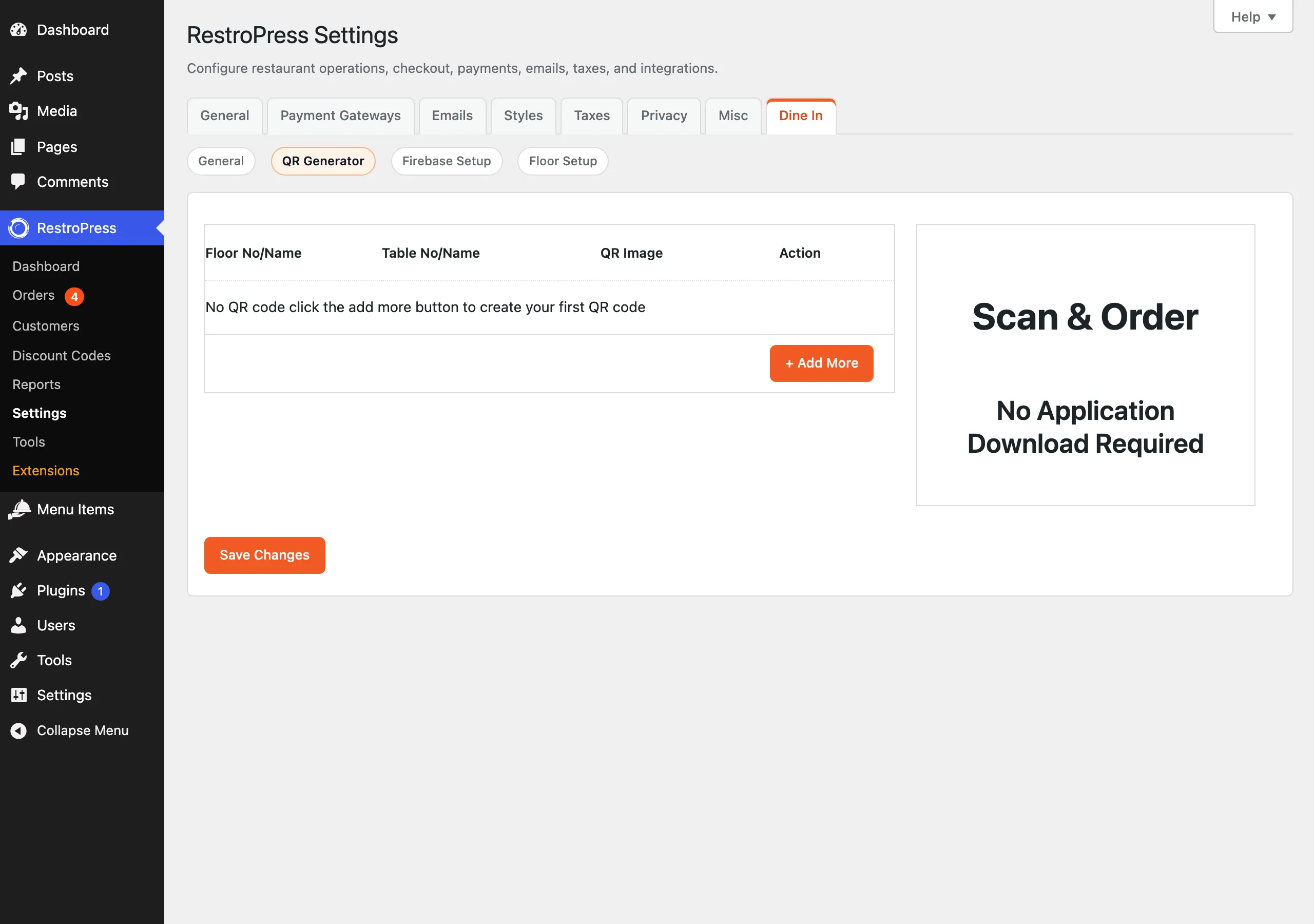
Under Locate your table, add one row per table and save. Enter the table as a name or number; add a floor after a dash, for example 5-Ground (table 5, floor Ground). Saving generates a PNG for each row in uploads/rpress-dine-in/qr-codes, encoding the DineIn page address with table_id, table_no and, if present, floor query arguments. The settings screen loads a print library for the QR frames. Removing a row deletes its image.
Firebase Setup#
| Setting | What it does |
|---|---|
| Firebase Service Account | Service account JSON used to send push notifications. JSON only. |
| Waiter Firebase Service Account | Optional. Use when the waiter app belongs to a different Firebase project. |
| Firebase Config | Web config JSON for push notifications. When you save it, the plugin writes firebase-config.js into the web build folder. |
| Waiter Firebase Config | Optional config JSON for a separate waiter-app project. |
| Firebase Vapid Key | Web push key. |
Floor Setup#
Floor numbers: floor names separated by commas, used by the QR generator and the waiter app.
How it works#
Guest#
- The guest scans the table QR code and the DineIn page loads the app for that table.
- The app shows categories, food items and add-ons from RestroPress (hiding non-vegetarian items if Veg only is on).
- The guest places an order, with login first if required. If the table already has an active order, a second guest is told "This table already has an active order. Please use the existing order until the table is empty."; the owner, a waiter or an admin can add items to the live order instead. Changes to a placed order are submitted as a change request ("Order Change Request has been submitted please wait some time.").
- They can call the waiter (if enabled) and request the bill. Depending on Show Payment Gateways they choose a payment method before ordering or at the bill stage. Stripe, PayPal, Square and Paytm have their own payment steps; Paytm orders are created only after Paytm confirms payment.
Restaurant#
- The order appears in RestroPress orders with service type Dinein and the table ID stored on the order.
- Waiters (users with the
Waiterrole) can be assigned to tables: edit the waiter's user profile and use Assign Waiter To Table Name. Notifications for a table go to its assigned waiters. - The extension stores a dine-in time on the order (
dinein_order_current_timeanddinein_order_take_time) when RestroPress order details are saved with those fields; the KDS and POS extensions also write these values.
Shortcodes, blocks, widgets#
There are none. The guest app is delivered by the page template "Restropress Dinein" (templates/class-rp-dinein-template.php), which the plugin applies to the page selected in DineIn page.
Developer reference#
REST namespace: rp-dinein/v1 (requests need the licence to be valid; most also need a DineIn JWT). Routes include: token and token/validate (JWT), login_signup, firebase_token_refresh, user-edit-profile, categories, foods, addons, table_list, tax, home, call_waiter, statuses, orders, add-orders, add_update_fooditem, request_bill, order_notes, update_notes, clear_notes, order_update/(order_id)/(order_status) and the payment routes dinein-stripe-payment-intent, dinein-paypal-create-order, dinein-paypal-capture-order, dinein-square-payment, dinein-paytm-initiate-transaction, dinein-paytm-upi-intent, dinein-paytm-transaction-status, dinein-paytm-capture-payment and dinein-paytm-webhook.
| Hook | Type | Parameters | Purpose |
|---|---|---|---|
rpress_settings_dinein | filter | $settings (array by section) | Add or change fields on the Dine In settings tab. |
rpress_settings_sections_dinein | filter | $sections | Add or rename Dine In settings sections. |
rpress_dinein_layouts | filter | $layouts | Filter the list of guest app layouts. |
rp_dinein_available_payment_gateways | filter | $gateways | Change the gateways DineIn considers available. |
rp_dinein_default_payment_gateways | filter | $gateways | Change the built-in gateway definitions (UPI, Paytm, cash). |
rp_dinein_payment_gateway_setting_options | filter | $options, $available_gateways | Options shown for gateway selection. |
rp_dinein_enabled_app_payment_gateways | filter | $gateways, $selected_gateways, $available_gateways | Final list of payment methods sent to the app. |
rp_dinein_paypal_currency | filter | $currency | Override the PayPal currency code. |
rp_dinein_paypal_currency_setting_options, rp_dinein_paypal_supported_currencies, rp_dinein_currency_symbol | filter | Currency lists and symbols | Adjust PayPal currency choices and the symbol shown. |
rp_dinein_paypal_checkout_deep_link | filter | $url | Deep link used to return to the user app after PayPal. |
rp_dinein_stripe_credentials, rp_dinein_paypal_credentials, rp_dinein_square_credentials, rp_dinein_paytm_credentials | filter | Credentials array | Supply or override gateway credentials. |
rp_dinein_stripe_availability, rp_dinein_paypal_availability, rp_dinein_square_availability, rp_dinein_paytm_availability, rp_dinein_upi_availability | filter | Availability array (available, message) | Decide whether a gateway is offered. |
rp_dinein_stripe_public_config, rp_dinein_paypal_public_config, rp_dinein_square_public_config, rp_dinein_paytm_public_config | filter | Config array | Public config sent to the app. |
jwt_auth_* (for example jwt_auth_expire, jwt_auth_payload, jwt_auth_whitelist) | filter | Varies | The bundled JWT authentication uses the common jwt_auth_* filter names. |
// Turn the Cash option off in the DineIn app
add_filter( 'rp_dinein_enabled_app_payment_gateways', function ( $gateways ) {
    unset( $gateways['cash'] );
    return $gateways;
} );
Whether the array keys match the gateway IDs above depends on the gateways enabled on your site; inspect the array first.
Troubleshooting#
- The app cannot load the menu or returns an authorisation error. The licence status option must be
valid. Activate your key under RestroPress › Extensions. - The DineIn page is blank or shows an old app. The plugin picks the newer of the plugin's or the active theme's
templates/filesbuild. Check that the themetemplatesfolder was copied (it needs write access), and clear page and CDN caches. - QR code opens the wrong page. Select the DineIn page in settings and save the tables again so the codes are regenerated.
- "Login is required before placing a dine-in order." Is login required, or Enable mobile number login, is on.
- "Paytm merchant ID and merchant key are not configured.", "PayPal REST credentials are not configured." The gateway is offered but its credentials are missing.
- "This table order is locked by another user until the table is empty." Another guest owns the active order for that table; a waiter or admin can act on it.
- No waiter push notification. Check Enable Waiter Call Notification, the Firebase service account JSON, and that the waiter is assigned to the table.
- Hide section by class name does nothing. The function that prints the hiding CSS exists but is not connected to any hook in this version.
Changelog highlights#
- 2.0.4: Paytm dine-in app orders are created only after Paytm confirms successful payment; Paytm UPI aliases use the confirmed Paytm flow.
- 2.0.3: PayPal, Stripe and Square payment handling for dine-in orders; authenticated customers can keep editing active table orders.
- 2.0.2: active table order merge, table lock safeguards, waiter push notifications by assigned table (Firebase HTTP v1).