
Order Time, Intervals & Limits
On this page
Order Time, Intervals & Limits changes how customers choose a delivery or pickup time. It lets you set a different slot interval for delivery and for pickup, cap the number of orders per time slot, cap the number of items in one order, and hide the time selector for one or both services and show a message instead.
RestroPress 3.4 includes a free Order time slot interval (minutes) setting that applies to both services. This extension adds the following on top of it:
- A separate interval for delivery and for pickup.
- A maximum number of orders per slot, separately for delivery and pickup, with your own "limit reached" message.
- A maximum number of items per order, separately for delivery and pickup, with your own error message.
- Switching off the delivery time or pickup time selector and showing a message in its place.
When this extension is active, RestroPress does not show its own interval setting, and the extension's interval fields are used instead.
Requirements#
- RestroPress must be active. If it is not, the extension shows an error notice and deactivates itself.
- WordPress 4.0 or higher and PHP 5.4 or higher, as stated in the readme.
Installation#
- Go to Plugins › Add New › Upload Plugin, choose the ZIP and click Install Now.
- Click Activate.
- Open RestroPress › Settings › General and choose the Time Interval Order Limit section. A Settings link is also added to the plugin row.
The plugin code contains no licence field or update checker, so there is no licence key to enter.
Settings#
All settings are in RestroPress › Settings › General › Time Interval Order Limit, in a block titled Order Time, Interval & Limits.
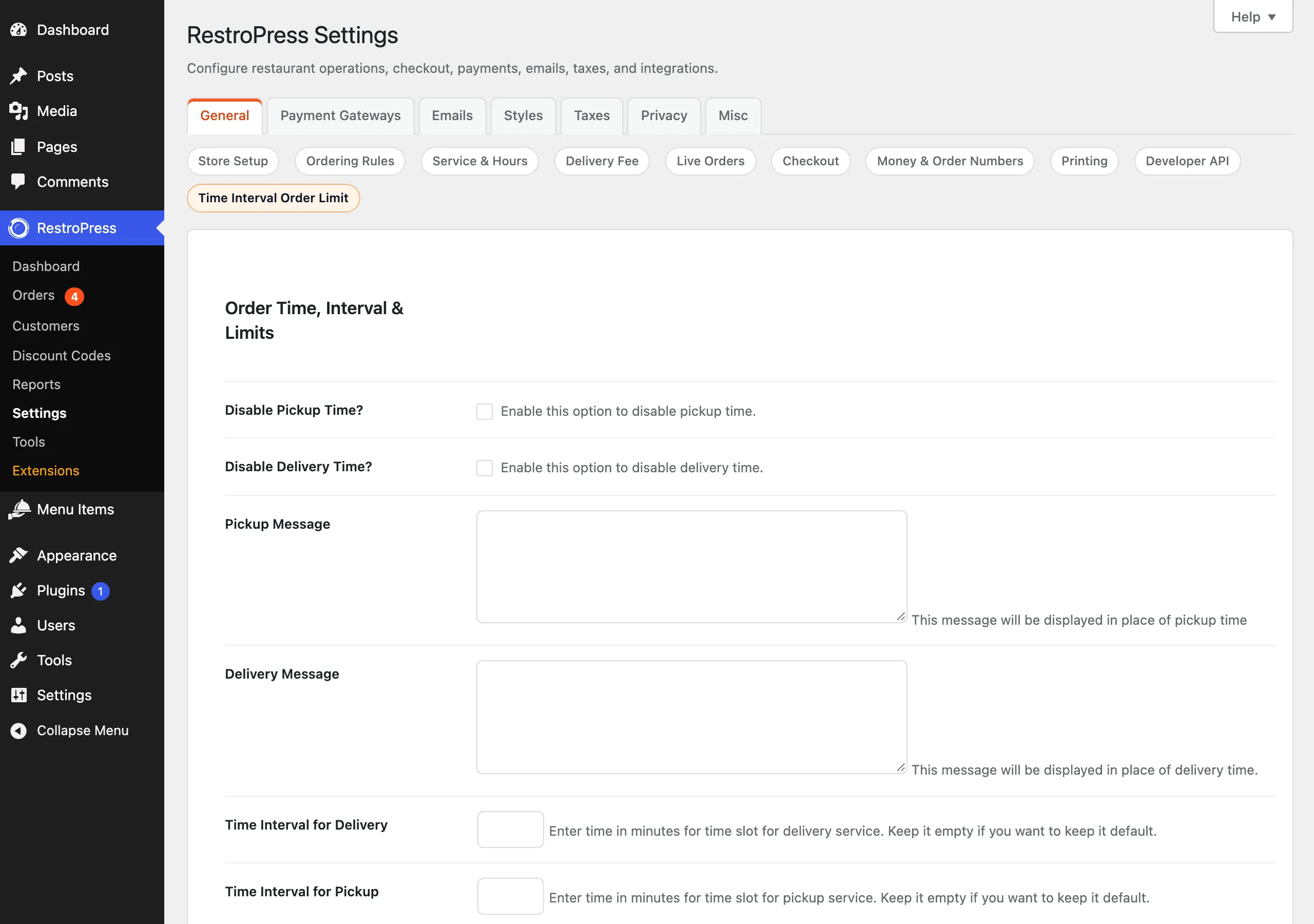
| Setting | What it does | Default |
|---|---|---|
| Disable Pickup Time? | Checkbox "Enable this option to disable pickup time." Hides the pickup time selector and shows the Pickup Message instead. | Off |
| Disable Delivery Time? | Checkbox "Enable this option to disable delivery time." Hides the delivery time selector and shows the Delivery Message instead. | Off |
| Pickup Message | Text shown in place of the pickup time. If pickup time is disabled and this is empty, it is saved as "Pickup time is currently hidden for this service." | Empty |
| Delivery Message | Text shown in place of the delivery time. If delivery time is disabled and this is empty, it is saved as "Delivery time is currently hidden for this service." | Empty |
| Time Interval for Delivery | Minutes between delivery time slots. Leave empty to keep the default interval. | Empty |
| Time Interval for Pickup | Minutes between pickup time slots. Leave empty to keep the default interval. | Empty |
| Max orders per delivery slot | Number of delivery orders accepted for one time slot. | Empty (no limit) |
| Max orders per pickup slot | Number of pickup orders accepted for one time slot. | Empty (no limit) |
| Order limit reached message | Message shown when the selected slot is full. | Falls back to "This time slot is full. Please select another slot." when the field is empty |
| Maximum items per delivery order | Maximum total quantity of items in a delivery order. Leave empty for no limit. | Empty |
| Maximum items per pickup order | Maximum total quantity of items in a pickup order. Leave empty for no limit. | Empty |
| Error message for max items | Message shown when the cart holds more items than allowed. | Falls back to "You have more than max allowed items in your cart. Please try to remove some." |
Rules for the values#
- Numeric fields accept positive whole numbers only. Anything else is reset to empty and an error notice reads "Some numeric values were invalid and were reset. Please use positive numbers only."
- When a service's time is disabled, its interval and slot-limit fields are ignored. The settings screen shows notes to that effect, and asks for a message if the field is empty.
- If both pickup and delivery time are disabled and any slot limit is set, saving shows a notice that slot limits are ignored.
- The code reads some per-service fields with a fallback to older single-value keys (
orders_per_interval,fooditems_per_order), so a value stored by an earlier version still applies when the per-service field is empty.
How it works#
Slot interval#
The extension hooks the RestroPress filter rp_store_time_interval. For delivery or pickup it returns your interval when one is set, otherwise the default RestroPress passes in.
Order limit per slot#
- The extension counts existing orders (status
publishorprocessing) with the same service date, the same service time and the same service type. - If that count is equal to or above the limit, the slot is rejected with the "Order limit reached" message. This check runs when the customer confirms a service time (
rpress_validate_slot), when proceeding to checkout, and again when the checkout form is validated.
The time is matched as an exact value, so each slot is counted by its own time string.
Items per order#
On proceeding to checkout and on checkout validation, the quantities of all cart items are added up. If the total is above the limit for the selected service, the customer sees the "Error message for max items" text and cannot continue.
Hidden service time#
- The time selector is replaced by the configured message. The message is also printed after the service time block by the
rpress_after_service_timeaction, and the extension's script hides the time dropdown and labels in the date/time popup. - To keep checkout working, the extension sets a fallback
service_timecookie (one hour ahead on today, or 12:00 on a later date) so the core time validation passes. - Stored order service time is returned as empty for orders of a service whose time is disabled, in the order screens and receipts.
Developer reference#
| Hook | Type | Parameters | Purpose |
|---|---|---|---|
rpress_get_otil_setting | filter | $otil_settings | Change the saved settings array (option rpress_otil) when read by the settings class. |
rpress_order_time_interval_limits | filter | $order_time_interval_limits | Change the field definition registered in the General tab. |
The helper rp_otil_is_service_time_hidden( $service_type = '', $payment_id = 0 ) returns true when the time is disabled for the given service (or for the service of the given order, or of the current cookie). Other extensions, such as Slot Limit, call it.
add_filter( 'rpress_get_otil_setting', function ( $settings ) {
    $settings['orders_per_delivery_interval'] = 4;
    return $settings;
} );Troubleshooting#
- The interval did not change. Leave the field empty only if you want the default. Check you saved a positive whole number. Another extension that also uses
rp_store_time_interval, such as Store Timing & Delivery Cutoff, builds slots with its own interval value, and the filter result of this extension is applied on top of it. - Customers can still choose a full slot. The slot remains in the list. The limit is enforced when the time is confirmed and at checkout, with the "Order limit reached" message.
- Limits are ignored. A limit is not enforced for a service whose time is disabled.
- The extension disappeared after activation. RestroPress was not active; the extension deactivates itself and shows a notice.
- Counts seem off. Only orders with status
publishorprocessingare counted, and the match is by exact time text.
Changelog highlights#
- 1.5.6: inline validation of the pickup and delivery messages in the admin, stricter numeric sanitising, default hidden-time messages, and a notice when both times are disabled.
- 1.5.5: fixes for the disabled-time message placement in the Date/Time popup and for time hide/show handling.
- 1.5.4: the disabled time dropdown now hides correctly on styled select themes and after the delivery option modal refreshes.