
RestroPress – Tips
On this page
Tips adds an optional tip section to the RestroPress checkout. Customers can pick a preset amount or percentage, type their own amount, or remove the tip again. The tip is added to the order as a fee, can be shown in a column on the orders list, and is available as an email tag.
Requirements#
- RestroPress, installed and active. If RestroPress is not active the plugin shows an error notice and deactivates itself. No minimum RestroPress version is checked; version 2.2 of the extension is marked as compatible with the RestroPress 3.4 checkout.
- The readme lists WordPress 4.0 and PHP 5.4 as minimums and WordPress 7.1 as the version it was tested up to.
Installation#
- In Plugins › Add New › Upload Plugin, choose the ZIP file and select Install Now.
- Select Activate.
- Open the settings from the Settings link on the Plugins screen, or go to RestroPress › Settings › General › Checkout and scroll to the tips fields.
This plugin has no licence key field and no update checker of its own.
Settings#
The tips settings are added to the existing checkout settings: RestroPress › Settings › General › Checkout.
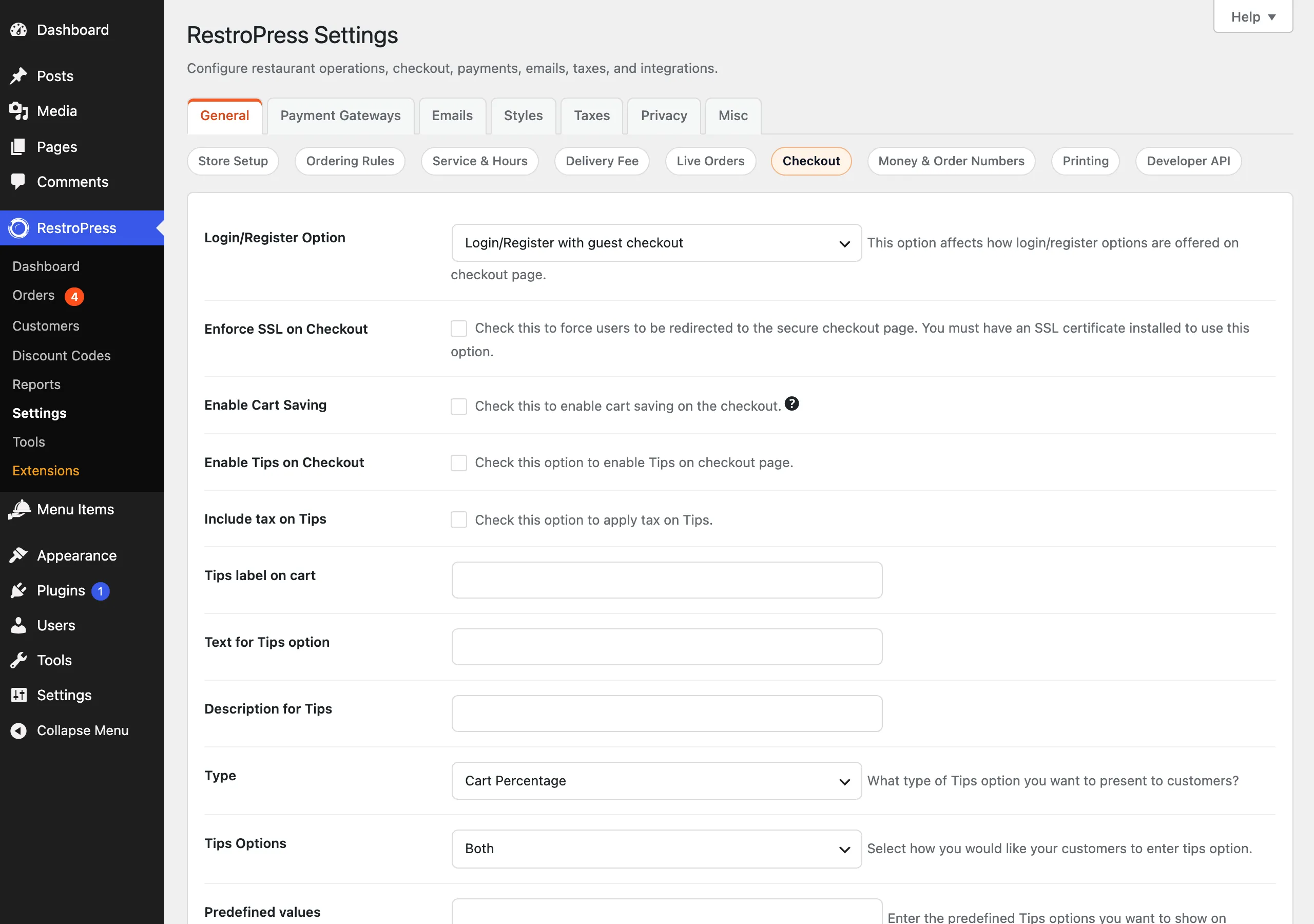
| Setting | What it does | Default |
|---|---|---|
| Enable Tips on Checkout | Shows the tip section on the checkout page. | Off |
| Include tax on Tips | When RestroPress taxes are enabled and this is ticked, the tax that applies to the tip amount is added on top of the tip. See Troubleshooting for a caveat. | Off |
| Tips label on cart | The name of the tip line in the cart, on the order and in the orders list column. | Tips |
| Text for Tips option | Heading above the tip choices. Also used as the description of the {tips} email tag. | Add a tip |
| Description for Tips | Small line of text beside the heading. | Tips are appreciated, but optional! |
| Type | "Flat Amount" makes the preset values currency amounts. "Cart Percentage" makes them percentages of the cart subtotal. | Cart Percentage |
| Tips Options | "Predefined Tips Values" shows only the preset buttons, "Custom Tips Entry" shows only a free amount box, "Both" shows both. | Both |
| Predefined values | The preset values, separated by commas, for example 10,15,20. Spaces are removed. No buttons are shown when this is empty. | Empty |
| Remove Tips Label | Text of the button that removes the tip. | No tip |
| Admin Tips Column | Adds a column to the orders list showing the tip on each order. The column heading is the "Tips label on cart" text. | Off |
How it works#
Customer side#
- On checkout the customer sees the tip heading and description, the preset buttons (shown as currency amounts for Flat Amount, or with a percent sign for Cart Percentage) and, depending on Tips Options, a "Custom Tip" box with an Add button.
- Choosing a button or adding a custom value sends an AJAX request. The tip is stored as a cart fee with the id
tip, replacing any earlier tip. The cart summary shows a new line with the tip, and the order total is updated. - A percentage tip is calculated on the cart subtotal. A custom value is read as a percentage when Type is "Cart Percentage" and as an amount when Type is "Flat Amount", except that the custom box always sends the value as an amount.
- The remove button, or choosing a value of 0, removes the tip and refreshes the total.
Restaurant side#
- The tip is saved with the order as a fee with the id
tip. - With Admin Tips Column on, the orders list shows each order's tip amount (0 when there is none).
- The email tag
{tips}is registered when tips are enabled. It outputs the tip amount of the order, formatted as currency, and can be used in email templates.
Developer reference#
The extension does not fire its own hooks. It registers the following.
| Name | Type | Purpose |
|---|---|---|
rpress_add_tips | AJAX action (logged in and guests) | Reads tip and type from POST and adds the tip fee. Returns JSON with the new total, tip value and the cart row HTML. |
rpress_remove_tips | AJAX action (logged in and guests) | Removes the tip fee and returns the new total as JSON. |
rpress_payments_table_columns, rpress_payments_table_column | filters used | Add and fill the Tips column on the orders list. |
rpress_add_email_tags | action used | Registers the {tips} email tag. |
rpress_purchase_form_after_user_info, rpress_purchase_form | actions used | Print the tip section; it is printed once per page. |
// Read the tip stored on an order
$fees = rpress_get_payment_fees( $order_id, 'fee' );
foreach ( $fees as $fee ) {
    if ( 'tip' === $fee['id'] ) {
        echo $fee['amount'];
    }
}
The tip is stored under the fee id tip. The settings are stored as RestroPress options with the keys enable_tips_on_checkout, inculde_tax_on_tips (spelled this way in the code), tips_cart_label, tips_text, tips_subtext, tips_type, tips_type_display, tips_values, remove_tips_label and show_tips_column.
Troubleshooting#
- The tip section does not appear. Check that Enable Tips on Checkout is ticked and that your theme or builder checkout still calls the standard RestroPress checkout hooks.
- No preset buttons. The buttons are built from Predefined values. If that field is empty, or Tips Options is "Custom Tips Entry", no buttons are shown.
- Tax looks too high. The tip is added to the cart as a normal fee, which RestroPress can tax by itself when taxes are enabled. With Include tax on Tips also ticked, the tax may be counted twice. Test one order with your tax settings before going live.
- Tip is lost or wrong after the cart changes. The tip is a fixed amount calculated when it is added. If the customer changes the cart afterwards, ask them to choose the tip again so a percentage is recalculated.
- Tips column is empty. Turn on Admin Tips Column. Orders placed without a tip show 0.
- Plugin deactivated itself. It deactivates when RestroPress is not active. Activate RestroPress first, then re-activate Tips.
Changelog highlights#
- 2.2: compatibility with the RestroPress 3.4 checkout redesign; fixed the total calculation and update in the cart sidebar; fixed an HTML markup error in the tips table row.
- 2.1: fixed a repeated tip being added for the delivery service type.
- 2.0: custom tips may now contain decimal values.