
Sliding Cart
On this page
Sliding Cart adds a floating cart button (or a cart bar) to your RestroPress menu pages. Selecting it opens the cart panel that RestroPress already provides, so customers can review their order without scrolling to it. It is aimed at menu layouts where the cart sits out of view, mainly on small screens.
This is a small extension. It does not build its own cart panel; it adds the trigger button, an item badge and a few settings.
Requirements#
- RestroPress (the extension calls RestroPress cart functions and relies on its cart markup and mobile cart drawer).
- Version 1.2.4 is documented here. The readme lists WordPress 5.4 or later, PHP 5.5 or later, and "Tested up to: 7.1".
Unlike the other extensions, this one does not check whether RestroPress is active, so activate RestroPress first.
Installation#
- Go to Plugins › Add New › Upload Plugin, choose the ZIP and select Install Now.
- Select Activate.
- Go to RestroPress › Settings › General › Sliding Cart and enable it (see below).
The code contains no licence field and no update checker.
Settings#
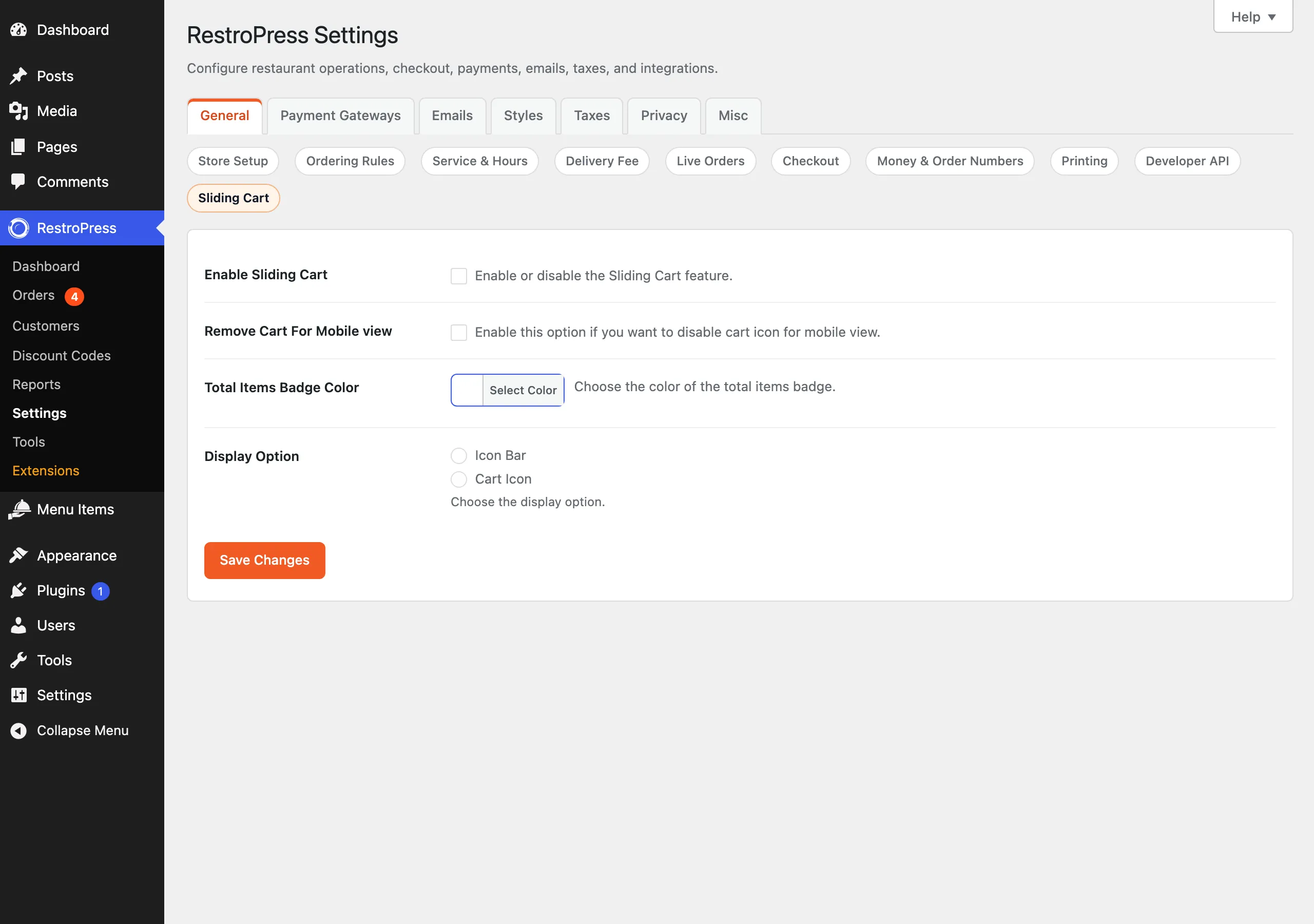
Go to RestroPress › Settings › General › Sliding Cart.
| Setting | What it does | Default |
|---|---|---|
| Enable Sliding Cart | "Enable or disable the Sliding Cart feature." Nothing is shown to customers until this is ticked. Option key sliding_cart_enable. | Off |
| Remove Cart For Mobile view | "Enable this option if you want to disable cart icon for mobile view." When ticked, the floating cart icon is hidden on screens up to 720px wide. Option key remove_cart_mobile. | Off |
| Total Items Badge Color | "Choose the color of the total items badge." A colour picker; the colour is applied to the item count number. Option key sliding_cart_badge_color. | Empty (theme colour) |
| Display Option | "Choose the display option." Icon Bar or Cart Icon. Option key display_option. | None selected |
Display Option starts with neither choice selected, and with neither selected nothing is drawn. Pick one and save.
How it works#
- With the extension enabled, the site footer prints one of two elements, depending on Display Option. Cart Icon is a circular cart icon fixed at the bottom right of the page (80px from the bottom, 69px from the right) with the item count as a badge. Icon Bar is a bar with a cart icon, the item count and the cart total, using the same
rp-cart-left-wrapelement that RestroPress uses for its mobile cart bar. - The element is shown only on pages that contain RestroPress markup (an element with the class
restropressinsidebody); on other pages it is hidden by the script. - Selecting the button triggers RestroPress's own cart drawer, locks page scrolling, and hides the bar. Closing the cart restores scrolling and shows the bar again.
- The item count is refreshed through the AJAX action
get_cart_detailson page load, 500 ms after a click on an add-to-cart button, and 500 ms after a click on a remove-from-cart link.
Developer reference#
| Hook | Type | Parameters | Purpose |
|---|---|---|---|
wp_ajax_get_cart_details and wp_ajax_nopriv_get_cart_details | AJAX action | POST security (nonce ajax-nonce) | Returns JSON with subtotal, cart_details (number of cart lines) and set_enablle (the enable option; the key is misspelled in the code). |
The extension fires no hooks of its own. It uses rpress_settings_general and rpress_settings_sections_general to register its settings, and wp_footer to print the button.
Troubleshooting#
- No button appears. Enable Sliding Cart, choose a Display Option, save, and clear page caches. Also check you are on a page that contains the RestroPress menu.
- The button is missing on phones. Check Remove Cart For Mobile view.
- The badge number does not update. The count request is sent with a nonce created when the page loads. On a fully cached page the nonce can expire, and the request then fails (the browser console shows "AJAX Error").
- The cart total shown in Icon Bar can lag. On a count refresh the script updates the item count only. The total in the bar is the value printed when the page loaded.
Changelog highlights#
The readme lists versions 1.2.4, 1.2.3, 1.2, 1.1 and 1.0.1 but has no text under them.