
RestroPress KDS
On this page
KDS (Kitchen Display System) connects RestroPress to the RestroPress KDS mobile app so kitchen staff can see the orders assigned to them, set preparation times and mark orders progressing or completed, without printed tickets. The extension adds the settings, the REST API the app talks to, order-to-kitchen assignment, and push notifications. The app itself is a separate download.
Kitchen staff are WordPress users with the shop_worker role. Each such user is a "kitchen" in the plugin.
Requirements#
- RestroPress (free plugin) active. If it is not active when the plugin loads, it deactivates itself and shows an error.
- A valid extension licence. The app's API calls are refused with "Your license key has been expired or not updated." until the licence status is valid.
- The RestroPress KDS mobile app on the kitchen devices. Orders are assigned through the order screen, so staff who assign orders work in the normal RestroPress admin.
- A Firebase project for push notifications. The plugin reads a service account file named
service_account.jsonfrom its own folder. - Optional: a JWT authentication plugin. If one providing the
JWTAuth\Setupclass is present, the logged-in kitchen user is resolved from the token.
Installation#
- Go to Plugins › Add New › Upload Plugin, upload the ZIP and click Activate.
- Open RestroPress › Extensions, enter your licence key on the KDS card and click Activate License. The licence enables updates and the API.
- Open RestroPress › Settings › General › Kitchen Display System and tick Enable API.
Settings#
Settings are at RestroPress › Settings › General › Kitchen Display System (admin.php?page=rpress-settings&tab=general§ion=rpress-kds); a Settings link is also on the Plugins screen.
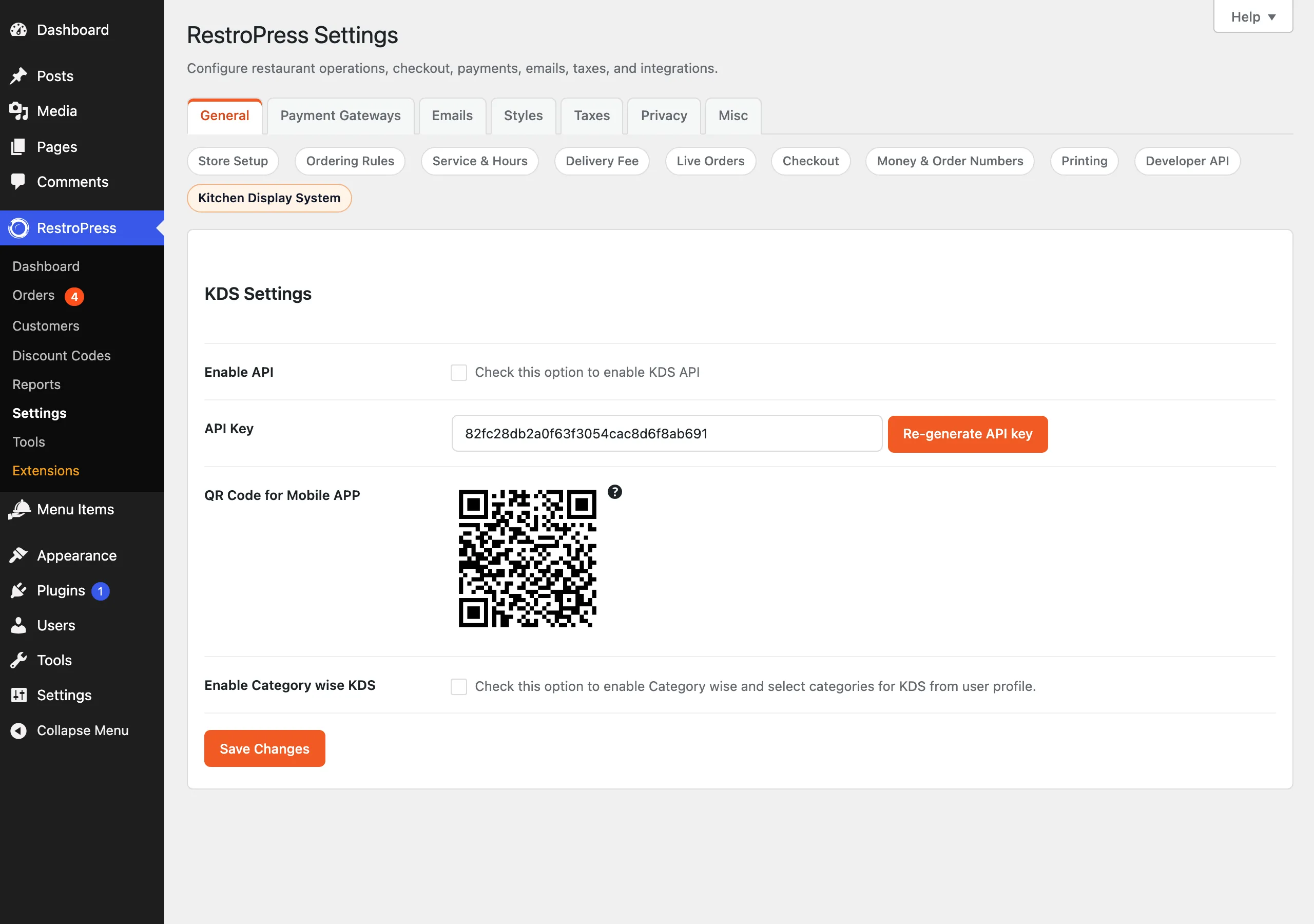
| Setting | What it does | Default |
|---|---|---|
| Enable API | Turns the KDS API on. While off, the app receives "Please enable api from admin setting." | Off |
| API Key | Read-only key the app must send. A random 32-character key is created the first time the settings load. Re-generate API key replaces it (the app must then be given the new key). | Generated automatically |
| QR Code for Mobile APP | A QR code containing your site URL and the key. Scanning it in the app skips typing them. | Generated automatically |
| Enable Category wise KDS | Adds fields to shop worker profiles so each kitchen only receives orders containing items from assigned food categories. | Off |
| Enable Auto Assign Order | When an order is set to Accepted, it is automatically assigned to eligible kitchens. It takes effect only when Category wise KDS is also on. | Off |
The QR code image is written to a qr folder inside the plugin; the web server must be able to write there.
User profile fields (when Category wise KDS is on)#
On the profile of a user with the shop_worker role you will find:
- All categories will assign. If ticked, any order can be assigned to this user.
- Assign Categories. The food categories this kitchen handles. Orders with at least one item in these categories qualify. If none are selected, the user qualifies for every order.
How it works#
Restaurant#
- Create a WordPress user for each kitchen with the
shop_workerrole. - Open an order in RestroPress › Orders. In the order details totals area you will see Kitchen Prepare Time in Min : (two digits) and Assign Kitchen:, a multi-select of qualifying shop workers. Update the order to save; newly added kitchens get a push notification, and the prepare time sets the serve time (stored as
dinein_order_take_time). - The orders list has a Kitchen column showing assigned kitchens.
- With auto assign on, setting an order to Accepted assigns it to every qualifying kitchen without opening the order, unless a kitchen time was just entered on the order screen.
Kitchen app#
- On first start the app asks for the site URL and API key, or scans the settings QR code.
- The shop worker logs in with their WordPress username and password. Other roles are refused: "Only shop worker accounts are allowed to login in KDS app."
- The app lists orders assigned to that kitchen, filtered by status, date or service, and the kitchen changes an order's status. Changing the status calls the normal RestroPress order status update, and completing an order records who completed it and when (
_rpress_kds_completed_by,_rpress_kds_completed_at). - Push notifications go to the kitchen's registered devices for new assigned orders, status changes and item changes. While a kitchen changes a status itself, its own notifications are muted so it is not alerted about its own action.
Developer reference#
REST namespace: restropress-kds/v1. All routes are POST and are guarded by the API key (parameter api_key) plus the licence and Enable API checks.
| Route | Purpose |
|---|---|
validate_key | Checks the key; replies whether a JWT plugin is in use. |
login | Signs in a shop worker (username, password); returns id, email, names, role, avatar. |
firebase_token_refresh | Registers a device token for a kitchen and returns category settings for that kitchen. |
orders | Order list for a kitchen. Accepts paging (paged, per_page), status, payment_status, service, service_date, order_start_date, order_end_date, s (search), and branch parameters when Multi-Location is active. |
order/change_status | Sets an order's status (order_id, order_status) and optionally current_time, serve_time, prepare_duration. The order must be assigned to the calling kitchen. |
kitchen_list | All shop workers with their category assignments. |
kitchen_time_list | Per-kitchen workload for a date and time (accepted or processing orders). |
| Hook | Type | Parameters | Purpose |
|---|---|---|---|
assigned_order_to_kitchen | action | $kitchen_id, $order_id, $duration, $current_time, $serve_time | Runs after an order is assigned to a kitchen and the notification is sent. |
rp_kds_addon_basenname | filter | $basename | Changes the plugin basename used for the Settings link on the Plugins screen (spelling as in the code). |
jwt_auth_whitelist | filter (provided by a JWT plugin) | $endpoints | The extension adds validate_key to the whitelist. |
// Log every kitchen assignment
add_action( 'assigned_order_to_kitchen', function ( $kitchen_id, $order_id, $duration ) {
    error_log( "Order #$order_id assigned to kitchen $kitchen_id ($duration min)" );
}, 10, 3 );
Assignments are stored as repeated post meta _rpress_kitchen_id on the order; kitchen preparation minutes are in kitchen_prepare_time.
Troubleshooting#
- "Your license key has been expired or not updated." Activate the licence under RestroPress › Extensions.
- "Please enable api from admin setting." Tick Enable API and save.
- "You have given invalid API key..." The key in the app differs from the settings. Re-scan the QR code, or copy the current key; re-generating invalidates the old one.
- "Order assign to different kitchen." The kitchen trying to change status is not assigned to that order.
- Kitchen cannot be chosen on an order. With category-wise on, only shop workers whose categories match an item in the order (or with All categories ticked) are listed.
- No push notifications. Check the Firebase
service_account.json, that the app has registered its device token, and that the kitchen is assigned to the order. - QR code image missing. The plugin's
public/qrfolder must be writable.
Changelog highlights#
- 1.2.2: order status changes made through RestroPress no longer send a push notification while the order is locked (needs RestroPress 3.4.11 for the full fix).
- 1.2.1: notification alert sounds and locking; improved notification state logic; fixes for timer and duration normalisation.
- 1.2: notification fixes.