
RestroPress Adyen Payment Gateway
On this page
RestroPress Adyen Payment Gateway lets customers pay by card on your checkout page using Adyen's secure card fields. Card details go to Adyen directly from the browser; your site receives only an encrypted payment payload. The plugin supports 3D Secure redirects and updates the order from Adyen's responses and webhooks. It is for restaurants that already have an Adyen merchant account.
Requirements#
- RestroPress (the plugin only checks that RestroPress's gateway functions exist, not a version). The readme lists WordPress 5.8 and PHP 7.4 or later.
- An Adyen merchant account with an API key, a merchant account name and a client key, for test and for live. For live mode you also need the live endpoint prefix from Adyen's Developers > API URLs page.
- The official Adyen PHP library (
adyen/php-api-library^29.0). The plugin loads it fromvendor/autoload.phpin its own folder. The release in the source tree has novendorfolder, so if your copy lacks one, runcomposer installin the plugin folder. Without it, payments fail with "Adyen PHP SDK is not installed. Run composer install in the gateway plugin directory." - Your site must be on HTTPS and its URL added as an allowed origin for the client key in Adyen.
Installation#
- Install the plugin ZIP from Plugins › Add New › Upload Plugin and activate it.
- Go to RestroPress › Settings › Payment Gateways, tick Adyen under Payment Gateways on the General section and save. Optionally pick it as the Default Gateway.
- Open the Adyen section of the same tab (also linked as Settings on the Plugins screen) and fill in the settings below.
- Copy the webhook URL shown in that section into Adyen's Customer Area.
The plugin has no licence key field, so nothing is entered under RestroPress › Settings › Licenses for it.
Settings#
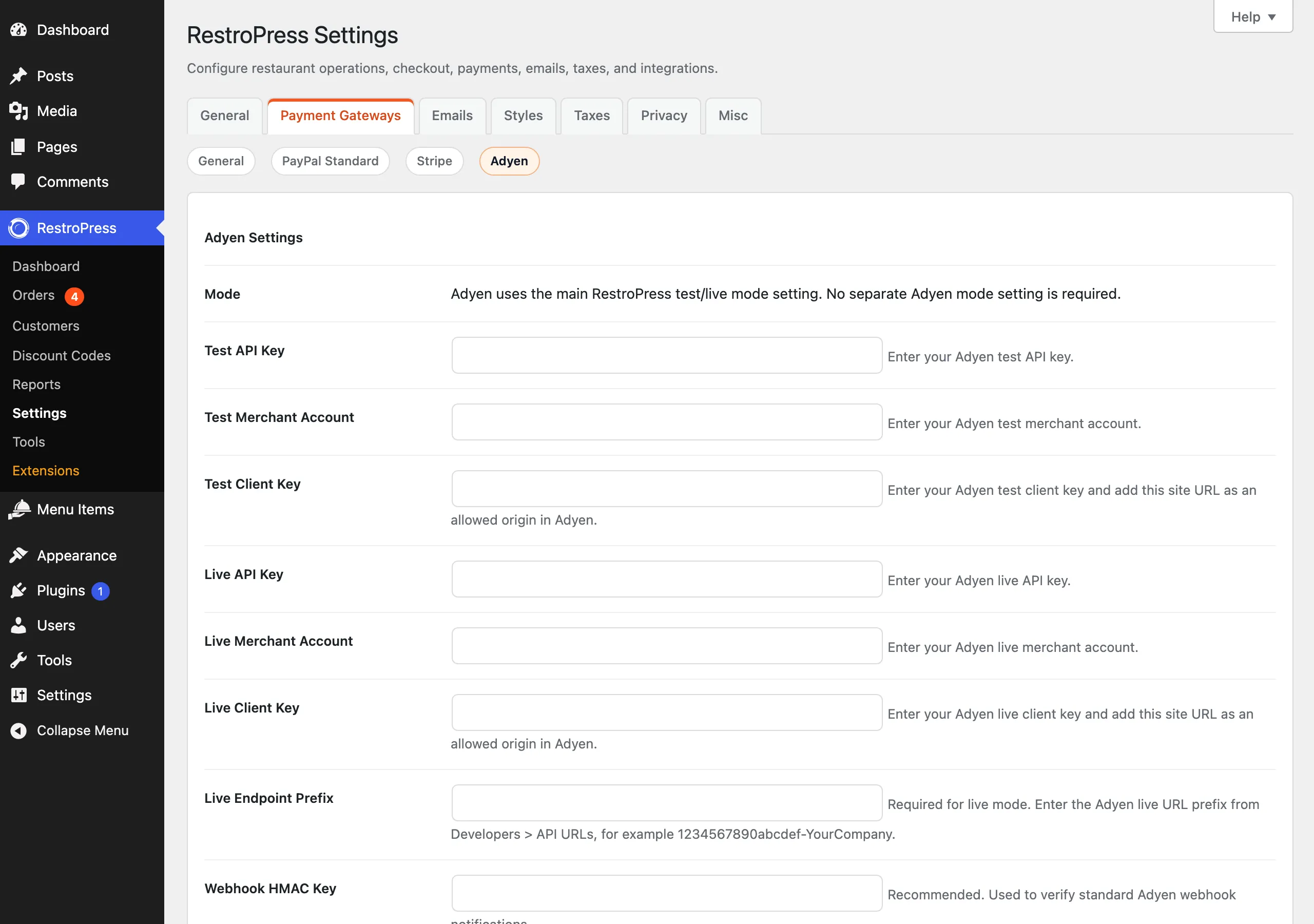
Under RestroPress › Settings › Payment Gateways › Adyen. The section follows the main Test Mode checkbox on the General section; there is no separate Adyen mode switch.
| Setting | What it does | Default |
|---|---|---|
| Test API Key | Adyen test API key (password field). | Empty |
| Test Merchant Account | Adyen test merchant account name. | Empty |
| Test Client Key | Test client key used by the card fields. Add your site URL as an allowed origin in Adyen. | Empty |
| Live API Key | Adyen live API key (password field). | Empty |
| Live Merchant Account | Adyen live merchant account name. | Empty |
| Live Client Key | Live client key. Add your site URL as an allowed origin in Adyen. | Empty |
| Live Endpoint Prefix | Required for live mode, for example 1234567890abcdef-YourCompany. Live checkout does not load without it. | Empty |
| Webhook HMAC Key | "Recommended." Used to verify webhook notifications. Enter the hexadecimal key from Adyen. If left empty, webhooks are accepted without any signature check. | Empty |
| Capture Immediately | Asks Adyen to capture authorised payments straight away (sends captureDelayHours of 0). If off, Adyen's account-level capture setting applies. | Off |
| Webhook URL | Read-only. Shows the REST webhook URL and a legacy fallback URL. | n/a |
If a test key, merchant account or client key is empty in test mode, the plugin falls back to the matching live value. The gateway counts as configured only when the API key, merchant account and client key for the current mode are set, and, in live mode, the endpoint prefix as well. When it is not configured the checkout shows "Adyen is not configured. Please contact the store owner."
How it works#
At checkout#
- When Adyen is enabled and configured, the checkout page loads Adyen's Web SDK (version 3.10.1) and asks Adyen for the payment methods available for the cart total, the shop country and the store currency.
- Choosing Adyen shows a "Credit / Debit Card" box with Adyen's card component. The card holder name is required. The form cannot be submitted until the card details are valid; otherwise the message "Please complete your Adyen payment details." appears.
- On submit the plugin creates the order as
pendingwith gatewayadyenand sends the payment to Adyen with the order ID as the reference. - If Adyen answers
Authorised, the order becomes completed (publish), the PSP reference is saved as the transaction ID, an order note is added, the cart is emptied and the customer goes to the success page. - If Adyen answers
RedirectShopper(3D Secure and similar), the customer is sent through an intermediate page to the bank. On return the plugin sends the result to Adyen's payment details call.Authorisedcompletes the order as above; anything else sets it tofailedand returns the customer to checkout with the reason. - Any other result sets the order to
failedand shows "Payment failed:" with Adyen's message.
In the admin#
- The order shows the Adyen PSP reference as the transaction ID and order notes such as "Adyen payment authorised. PSP reference: ...".
- Adyen's raw responses are stored in order meta (
_adyen_payment_response,_adyen_details_response,_adyen_last_webhook). - Gateway errors are recorded in the RestroPress error log, and events are written to the PHP error log with the prefix
[rpress-adyen]; keys and payment data are redacted.
Webhooks#
In Adyen's Customer Area, add a standard webhook pointing to the URL shown in the settings (/wp-json/rpress-adyen/v1/webhook on your site). A legacy URL, /?rpress-listener=adyen-webhook, also works. Only the AUTHORISATION event is acted on: a successful one sets the matching Adyen order to completed, a failed one sets it to failed. Other events (for example captures, cancellations or refunds) are ignored. Orders whose gateway is not Adyen are never changed. The plugin answers [accepted].
Refunds are not implemented. Refund from the Adyen Customer Area; the order in RestroPress is not updated.
Test mode shortcut#
In test mode, if the card holder name is exactly APPROVED (any case), the plugin requests the Adyen test response code that approves the payment.
Developer reference#
| Hook or route | Type | Parameters | Purpose |
|---|---|---|---|
rpress_adyen_settings | filter | $adyen_settings (array) | Change or add fields in the Adyen settings section. |
rpress-adyen/v1/webhook | REST route (POST) | Adyen notification JSON | Webhook endpoint; permission callback is open, authenticity depends on the HMAC key. |
rpress-listener=adyen-action, adyen-return, adyen-webhook | query listeners | payment_id where relevant | 3D Secure redirect page, return handler, legacy webhook. |
add_filter( 'rpress_adyen_settings', function ( $settings ) {
    unset( $settings['adyen_capture_immediately'] );
    return $settings;
} );Troubleshooting#
- Adyen is not configured. Please contact the store owner. A required key is missing for the current mode, or in live mode the Live Endpoint Prefix is empty.
- Adyen PHP SDK is not installed. The
vendorfolder is missing. Runcomposer installin the plugin folder. - Card fields do not appear or show an error. Check that your site URL is an allowed origin for the client key, that the page is served over HTTPS, and that the merchant account and key match the current mode.
- Payment gateway error. The call to Adyen failed. In test mode the Adyen message is shown to the customer; in live mode only "Payment gateway error. Please try again." appears. Check the order's notes, the RestroPress error log and the PHP error log.
- Order stays pending after payment. The webhook is not reaching the site (firewall, caching or security plugin blocking the REST route), or the HMAC key does not match. Failed HMAC checks are logged as
webhook_hmac_failed. - Webhook accepted but nothing changes. Only
AUTHORISATIONnotifications for Adyen orders are processed. - Invalid Adyen redirect action / Payment verification details were missing. The 3D Secure return was opened without the expected data or the stored action had already been used.
Changelog highlights#
- 1.0.0: Initial release (per readme.txt).