
RestroPress PhonePe Gateway
On this page
RestroPress PhonePe Gateway adds a PhonePe payment method to RestroPress checkout using PhonePe Standard Checkout. The customer is redirected to PhonePe's hosted payment page, and the order is confirmed by checking the result with PhonePe (on return, by webhook, and by scheduled retries) before it is marked paid. It also registers three REST endpoints so the RestroPress DineIn app can start and check PhonePe payments. It is meant for restaurants in India taking payments in INR.
This is the fuller of the two PhonePe plugins. The other one, restropress-phonepe-payment-gateway, is a small plugin that posts to the older PhonePe /pg/v1/pay API with a Merchant ID and salt key, and has no webhook, no scheduled retries, no UPI app options and no DineIn endpoints.
Requirements#
- RestroPress. If it is not active the plugin shows an admin notice and stays idle.
- WordPress 5.8 or later and PHP 7.4 or later (from the readme).
- Store currency set to INR, and an order total of at least INR 1. Otherwise checkout is stopped with "PhonePe payments require INR currency." or "PhonePe minimum payment amount is INR 1."
- A PhonePe merchant account with either OAuth credentials (Client ID, Client Version, Client Secret) or the dashboard's Merchant ID, Key Index and API Key.
- HTTPS on your site if you use webhooks (PhonePe requires it).
Installation#
- Install the ZIP from Plugins › Add New › Upload Plugin and activate it. Activation writes default values for the settings and clears any stored PhonePe access token.
- Open RestroPress › Settings › Payment Gateways, tick PhonePe in the gateway list and save.
- Open the PhonePe section on the same screen (the Plugins list also has a Settings link) and fill in the settings below.
- In the PhonePe Business Dashboard under Developer Settings › Webhooks, add the webhook URL shown at the bottom of the PhonePe settings section and enable the
checkout.order.completedandcheckout.order.failedevents.
There is no licence field in this plugin, so there is no licence key to enter and no update checker in its code.
Settings#
All settings are in RestroPress › Settings › Payment Gateways › PhonePe.
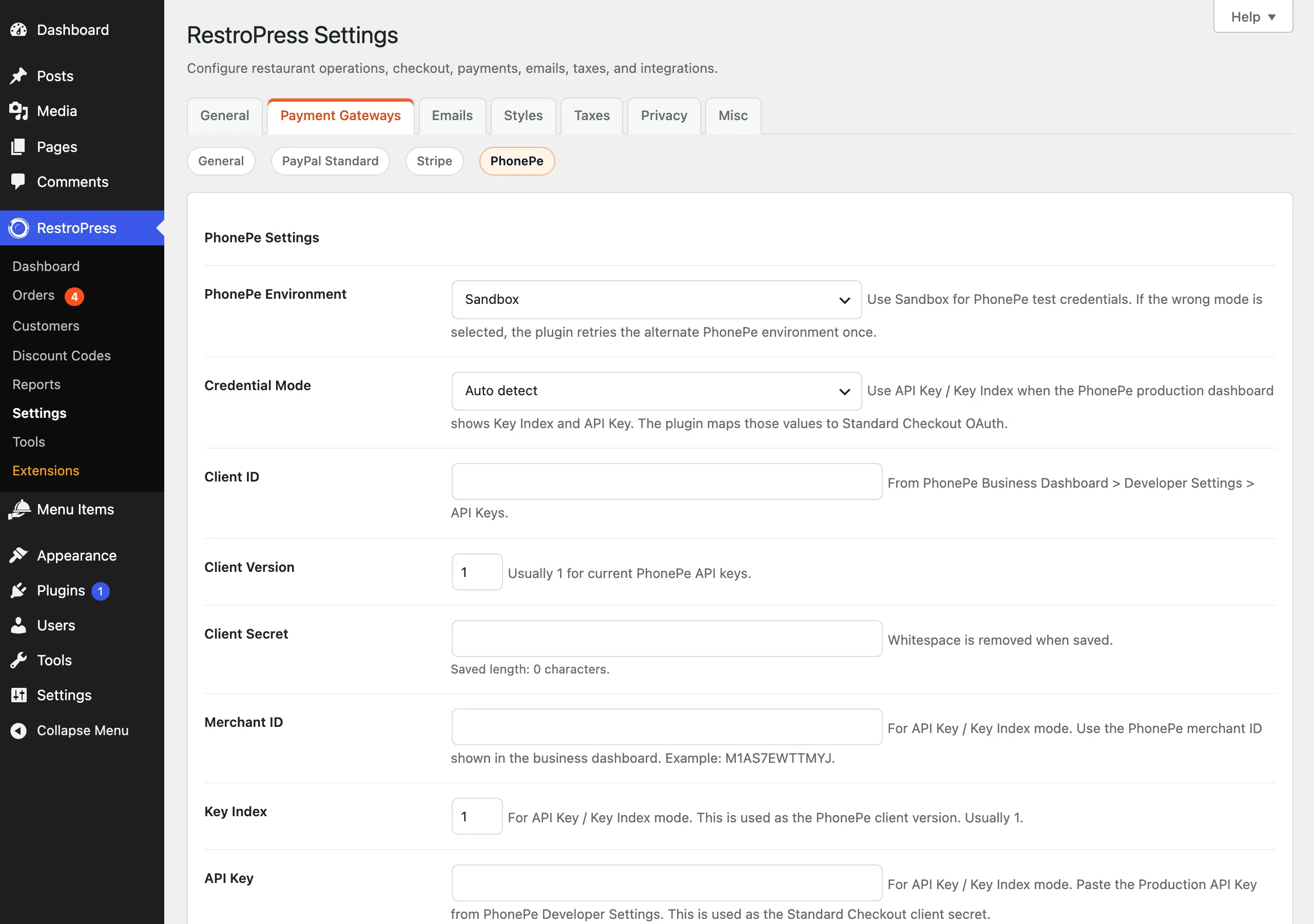
| Setting | What it does | Default |
|---|---|---|
| PhonePe Environment | Production or Sandbox. RestroPress Test Mode forces Sandbox. If PhonePe rejects the credentials with a 401, the plugin retries once against the other environment. | Sandbox |
| Credential Mode | "Auto detect", "OAuth Client Credentials" or "API Key / Key Index". It decides which set of fields must be filled for the gateway to count as configured. | Auto detect |
| Client ID | OAuth client ID from Developer Settings › API Keys. | empty |
| Client Version | OAuth client version, usually 1. | 1 |
| Client Secret | OAuth client secret. Whitespace is removed on save. | empty |
| Merchant ID | For API Key / Key Index mode: the merchant ID from the PhonePe dashboard. | empty |
| Key Index | For API Key / Key Index mode. Used as the client version, usually 1. | 1 |
| API Key | For API Key / Key Index mode: the production API key. It is used as the Standard Checkout client secret. | empty |
| Payment Expiry Seconds | How long the PhonePe payment stays open. Saved values are clamped to 300-3600. | 1200 |
| Disable PhonePe Retry | Returns the customer to your site after a failed attempt instead of keeping them in a retry loop on PhonePe. | On |
| Enable UPI App Deep Links | Comma-separated app values to show as UPI intent options. Accepted values: phonepe, gpay, paytm, bhim, amazon, cred, supermoney, others (aliases such as googlepay and amazonpay are mapped). | phonepe,gpay,cred,amazon,bhim,supermoney |
| UPI App Intent Mode | "Production only (recommended)", "Always enable UPI app intent" or "Always disable UPI app intent". In the first mode, app intents are requested only when the environment is Production. | Production only |
| Keep Card and NetBanking | When UPI intent is limited to the listed apps, also allow card and net banking payments. | On |
| Disable UPI Apps | Optional list in the same format. The field says it applies only when "Enable UPI App Deep Links" is empty. | empty |
| Payment Message | Message shown in PhonePe checkout. Tag: {order_id}. | Payment for order {order_id} |
| Webhook Username | Must match the username you create in PhonePe's webhook settings (5-20 letters, digits or underscores). | empty |
| Webhook Password | Must match the password in PhonePe's webhook settings (letters and numbers). | empty |
| Setup | Shows the webhook URL (your site's home URL with ?rppg_phonepe_webhook=1) and links to the PhonePe developer docs. Not a setting. | - |
In API Key / Key Index mode the plugin maps Merchant ID to the OAuth client ID, Key Index to the client version and API Key to the client secret, so it always talks to PhonePe's Standard Checkout OAuth API. If Merchant ID and API Key were pasted into the Client ID and Client Secret fields, they are still used as OAuth credentials.
How it works#
- The customer selects PhonePe at checkout. The plugin checks credentials, INR currency and the INR 1 minimum.
- RestroPress creates the order as
pending. The plugin builds a merchant order ID of the formRP<payment id>-<16 characters>, requests an OAuth access token (cached until shortly before it expires), and creates a PhonePe checkout order. The request carries the amount in paise, the expiry, a message, the return URL on your site, the retry flag and the UPI app configuration. If the customer entered a phone number it is sent to pre-fill the PhonePe login. - If PhonePe returns an error, or a checkout URL that is not on
phonepe.com, the payment is markedfailed, the error is recorded in the gateway error log and the customer is sent back to checkout with the message. - Otherwise the cart is emptied, a note "PhonePe checkout created. Merchant order ID: ..." is added, three WP-Cron status checks are scheduled (2, 5 and 15 minutes), and the customer is redirected to PhonePe.
- When the customer comes back (
?rppg_phonepe_return=1), the plugin validates the payment key, asks PhonePe for the order status and applies it. Completed sets the payment topublish, moves the order status topendingfor the restaurant, stores the PhonePe transaction ID and adds a note naming the source (return, webhook, cron or DineIn status). Failed sets the payment tofailedand sends the customer to the failed-transaction page. Anything else leaves the payment pending and the customer goes to the success page. - PhonePe's webhook calls the same status handling. The webhook is accepted only if its Authorization header equals the SHA-256 of
username:passwordusing the values in the settings; if the username or password is empty, every webhook is rejected with 403. Events other thancheckout.order.completedandcheckout.order.failedare ignored.
A payment already marked paid is not reverted by a later failed or pending status. The plugin does not implement refunds: refund the customer in the PhonePe dashboard.
DineIn app endpoints#
For the RestroPress DineIn app the plugin registers three routes under /wp-json/rp-dinein/v1/, all accepting GET or POST and all open to any caller (their permission callback is __return_true). They are also added to the jwt_auth_whitelist filter.
dinein-phonepe-initiate-payment: takesorder_id(and optionallytable_id, phone and email fields,amount). It creates a PhonePe checkout for an existing order, or creates a new pending order when no validorder_idis given and an amount is supplied. It returns JSON withredirect_url,merchant_order_idand PhonePe's response. With GET it redirects straight to PhonePe.dinein-phonepe-transaction-statusanddinein-phonepe-capture-payment: both look up the order byorder_id,payment_id, a merchant order ID or a PhonePe order ID, fetch the status from PhonePe, apply it and return fields such aspayment_status(Paid, Failed or Pending),paidandcaptured.
Developer reference#
The plugin does not define its own filters. It fires one action, rppg_phonepe_verify_payment (parameters $payment_id, $attempt), as a scheduled single event to re-check a payment. Other integration points are the REST routes above and the order meta it stores: _rppg_merchant_order_id, _rppg_phonepe_order_id, _rppg_phonepe_last_state and _rppg_phonepe_payment_mode.
Troubleshooting#
- "PhonePe payment gateway is not configured. Please contact the store." The fields required by the chosen Credential Mode are empty.
- "PhonePe did not return a valid checkout URL." PhonePe replied without a redirect URL on
phonepe.com. Check the environment and credentials; sandbox credentials fail on Production and the reverse. - Payments stay pending. Confirm the webhook URL is added in PhonePe, is HTTPS, and that the webhook username and password match. Without a webhook the plugin falls back to the return check and the three WP-Cron retries.
- Webhook returns 403. The Authorization header did not match the SHA-256 of
username:password, or the username or password setting is empty. - PhonePe app buttons do not appear in Sandbox. With the default UPI App Intent Mode ("Production only") app intents are switched off outside Production.
- Errors from PhonePe are written to the RestroPress gateway error log against the order.
Changelog highlights#
- 1.0.7: fixed fatal conflicts when the PhonePe and Paytm gateways are active together; settings callbacks and constants are scoped to PhonePe.
- 1.0: initial released version.