
Pay by cash and Test Payment
On this page
RestroPress includes two offline payment options that do not contact any payment provider. Pay by cash (gateway ID cash_on_delivery) lets customers pay when the order is delivered or collected. Test Payment (gateway ID manual) places an order with no payment at all, which is useful for trying your checkout. Neither has its own settings section: you only turn them on or off.
Enable them#
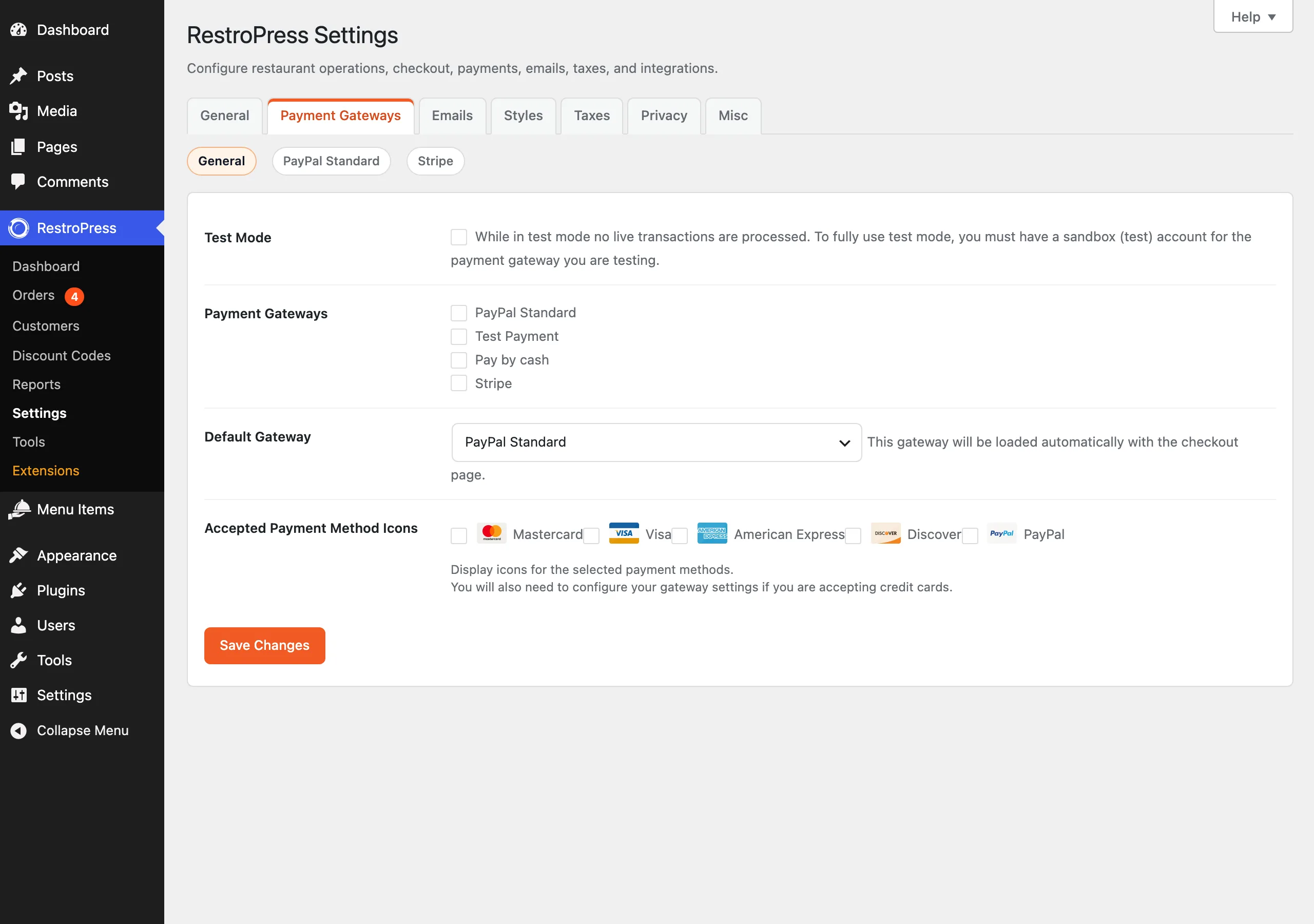
- Go to RestroPress › Settings › Payment Gateways and open the General section.
- Under Payment Gateways ("Choose the payment gateways you want to enable.") tick Pay by cash and, while testing, Test Payment.
- Pick the one customers should see first under Default Gateway ("This gateway will be loaded automatically with the checkout page.").
- Click Save Changes.
If you enable only one gateway, customers go straight to it. If you enable several, the checkout shows a Payment choice, with the default gateway first. The options are labelled Pay by cash and Test Payment. If no gateway is enabled, checkout shows "You must enable a payment gateway to use RestroPress".
What customers see#
Both options show no card form. The customer fills in their details, chooses the option and places the order. They go directly to the order confirmation page with their receipt, and the cart is emptied.
What happens to the order#
- Pay by cash. The order is saved with payment status Processing and order status Pending. It is never marked Paid automatically, because RestroPress cannot know when you received the cash. When you collect payment, set the payment status to Paid in the order yourself.
- Test Payment. The order is saved with payment status Processing. It is also not marked Paid automatically.
- In the orders list and in the order details the gateway shows as Pay by cash or Test Payment.
- With Order Auto Accepted on (RestroPress › Settings › General), these two are treated as offline gateways and are accepted automatically, without waiting for payment. Online gateways such as Stripe and PayPal wait until the order is Paid.
Test Payment and free orders#
- When the order total is zero, checkout hides the gateway choice and uses Test Payment behind the scenes, even if you did not enable it for paying customers. A zero-total order in the admin shows the gateway as Test Payment.
- Test Payment is independent of Test Mode. It works whether Test Mode is on or off, so untick it under Payment Gateways before you go live, or customers will be able to place orders without paying.
Common problems#
- Customers can order without paying. Test Payment is enabled. Untick it in Payment Gateways › General.
- Cash orders show Processing, not Paid. This is by design. Mark the order Paid once you have the money.
- "Payment Error" in the gateway log. If saving the order fails, the customer is sent back to checkout and a "Payment Error" entry ("Payment creation failed while processing with Cash On delivery order" or "...a manual (free or test) order") is recorded.
Developer notes#
- Actions
rpress_gateway_cash_on_deliveryandrpress_gateway_manualprocess the order for each gateway. - Filter
rpress_offline_payment_gatewayssets which gateway IDs count as offline (defaultmanual,cash_on_delivery,cod). Functionrpress_is_offline_gateway()checks it. - Filters
rpress_payment_gateways,rpress_enabled_payment_gateways,rpress_default_gateway,rpress_gateway_checkout_labelandrpress_gateway_admin_labelchange how gateways are listed and named. - Filter
rpress_chosen_gatewaychanges the gateway selected at checkout.