
Restropress-Rewards
On this page
Rewards is a loyalty-points scheme. Logged-in customers earn points on their orders, and can spend those points at checkout as a discount on a later order. You set the earn rate, the redemption rate, the minimum and maximum points per redemption, how long points last, and which menu items or categories cannot be paid for with points.
Points belong to WordPress user accounts, so guests do not earn or redeem points.
Requirements#
- RestroPress, active. The extension shows an admin error and deactivates itself if it is not.
- Customers need a WordPress account (logged in) to earn and use points. The order's user must exist; orders without a user ID earn nothing.
- The settings screen loads the Select2 library from
cdn.jsdelivr.netfor the multi-select boxes, so the admin browser needs internet access to that host. - Version 1.2.4 is documented here. The readme lists WordPress 4.0 or later and "Tested up to: 7.1".
Installation#
- Go to Plugins › Add New › Upload Plugin, choose the ZIP and select Install Now.
- Select Activate. A Settings link is added to the plugin's row on the Plugins page.
The code contains no licence field and no update checker.
Settings#
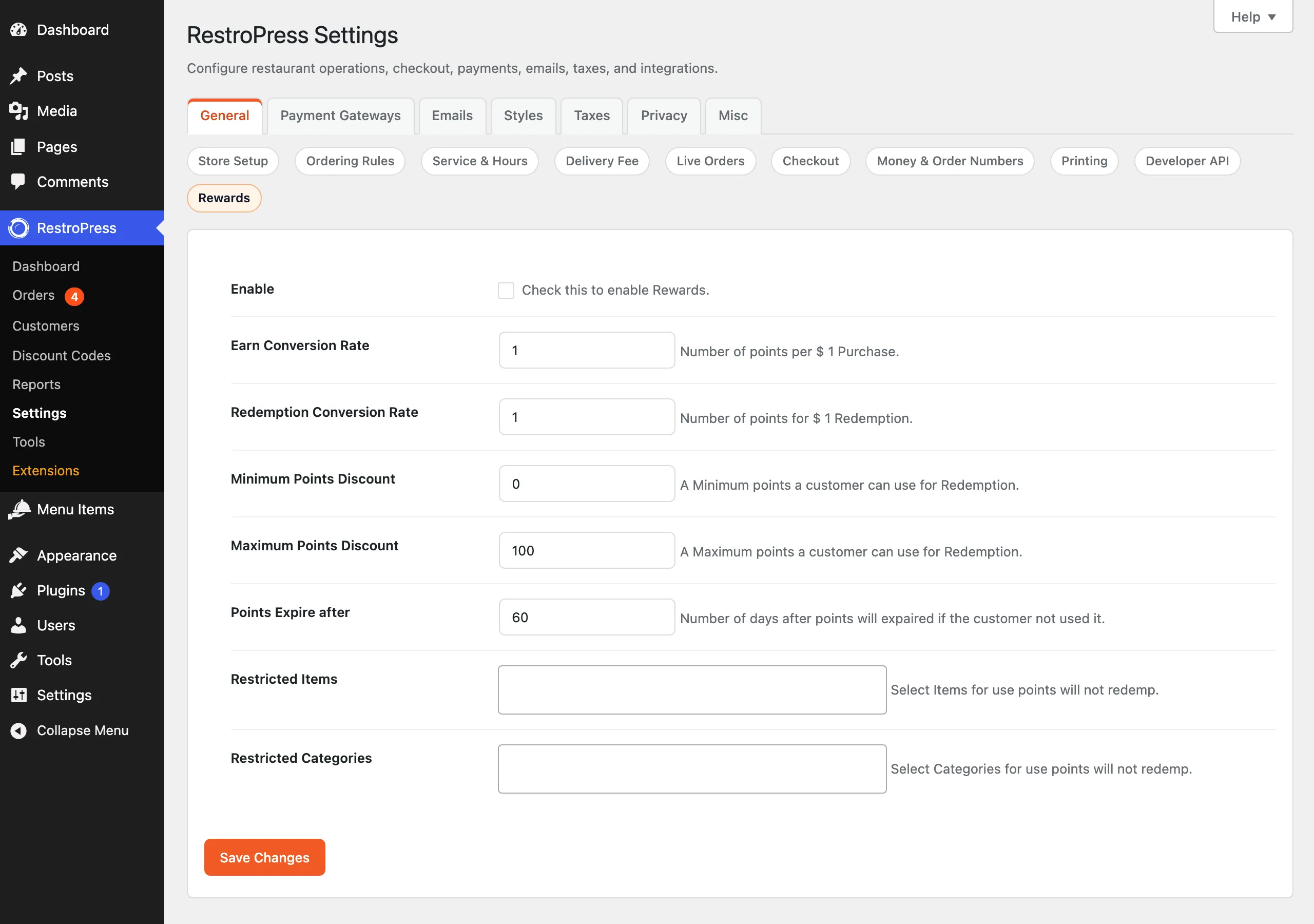
Go to RestroPress › Settings › General › Rewards. Values are saved in the option rp_rewards.
| Setting | What it does | Default |
|---|---|---|
| Enable | "Check this to enable Rewards." Turns on the checkout Rewards block and point earning. | Off |
| Earn Conversion Rate | "Number of points per [currency symbol] 1 Purchase." A customer earns this many points for each 1 unit of the order subtotal. Accepts decimals. | 1 |
| Redemption Conversion Rate | "Number of points for [currency symbol] 1 Redemption." This many points equal 1 unit of discount. | 1 |
| Minimum Points Discount | "A Minimum points a customer can use for Redemption." | 0 |
| Maximum Points Discount | "A Maximum points a customer can use for Redemption." | 100 |
| Points Expire after | "Number of days after points will expaired if the customer not used it." Days, counted from the order that earned the points. | 60 |
| Restricted Items | "Select Items for use points will not redemp." Menu items for which points are not accepted. | None |
| Restricted Categories | "Select Categories for use points will not redemp." Top-level Food Categories whose items are not accepted. | None |
The Restricted Categories list shows only top-level categories. The values shown above as defaults are what the screen displays before you save.
How it works#
Earning
- A logged-in customer places an order.
- When the order receipt page (the confirmation page that uses the receipt template) is displayed for the first time, points are added to the customer's balance: earn rate multiplied by the order subtotal (the total if there is no subtotal). The order stores the earned amount in the order meta
_order_rewards, which prevents double-crediting. - Points for restricted items or categories in the order are deducted from the earned amount. Points the customer redeemed on this order are also subtracted. If the result is zero or less, nothing is credited.
- The expiry date of the balance is set to today plus the "Points Expire after" days. A new order moves the expiry date for the whole balance.
- The confirmation page shows a banner "You earned N Reward Points!" with the new balance.
- If the order status is later changed to cancelled, the points the order earned (earn rate multiplied by subtotal) are removed from the order customer's balance, never below zero.

Redeeming
- At the top of the checkout form, a "Rewards" block shows "You have N points" (or "Please Login to know your Points." for visitors). Expired balances show 0.
- Customers with points see a box "Select amount of points you want to use" and an Apply button. A "How it works" link opens a popup with the earn rate, redemption rate, limits and expiry.
- The browser checks the minimum and maximum before sending the request. The server checks that the points do not exceed the balance or the cart subtotal, that the balance has not expired, and that no restricted item (or item in a restricted category) is in the cart.
- If valid, a negative cart fee labelled "Points" (fee ID
rewards) is added, the cart total updates, and the discount is saved with the order.
Restaurant
Under RestroPress › Customers two columns are added: Points and Expire Date. See Troubleshooting for a limitation in how these are read.
Developer reference#
| Hook | Type | Parameters | Purpose |
|---|---|---|---|
rpress_get_rewards | filter | $rewards (settings array from rp_rewards) | Adjust the rewards settings before they are used. |
rpress_checkout_rewards_help_url | filter | $url (default #rp-rewards-modal) | Point the "How it works" link at your own page instead of the popup. Return an empty string to hide the link. |
wp_ajax_rpress_apply_rewards | AJAX action (logged-in only) | POST redemp (points) | Applies the redemption fee. Returns JSON with msg of valid, expired, total_points_less or product_not_redeemable. |
Balances are stored as user meta: rewards (points) and rewards_exp (expiry date). To read them:
$points  = (int) get_user_meta( $user_id, 'rewards', true );
$expires = get_user_meta( $user_id, 'rewards_exp', true );Troubleshooting#
- No Rewards block on checkout. Tick Enable and save the Rewards settings.
- Points were not credited. Credit happens when the receipt page is displayed. A customer who never reaches the confirmation page (for example a payment that redirects elsewhere or a closed browser) is not credited until that page is shown. Guest orders (no user) never earn points.
- Customers see "Minimum redeem points is ..." when the balance is too low. The same message text is used for the minimum limit and for a request above the balance or the cart subtotal; the number shown is the limit that applies.
- "your redemp points expired". The balance's expiry date has passed. The balance itself is not deleted automatically.
- "Points are not applicable for added item". The cart contains a restricted item or an item from a restricted category. Remove it or change the restrictions.
- The Points column in Customers is blank or wrong. The columns read the user meta using the RestroPress customer ID as if it were the WordPress user ID. They are correct only where the two IDs match.
- Min and Max are not enforced if the AJAX request is sent directly. Those two limits are checked in the browser script only; the server checks the balance, expiry, restrictions and cart subtotal.
- The Select2 boxes do not appear in settings when the admin browser cannot reach
cdn.jsdelivr.net.
Changelog highlights#
- 1.2.4: added a "How it works" popup on checkout and an earned-points banner on the confirmation page; rewards calculated from the cart subtotal; removed the duplicate promo code input from the rewards section.
- 1.2.3: RestroPress 3.3 compatibility; points summary and redeem controls added to the checkout rewards block.
- 1.2.2: fixed earned points display.