
Allergens
On this page
Allergens lets you record which of the 14 standard allergens each menu item contains, or may contain traces of. Customers see small badges on the menu, a full list in the item popup, and a Hide items containing filter next to the menu search. It is built into RestroPress 3.5 and is on by default.
Turn it on#
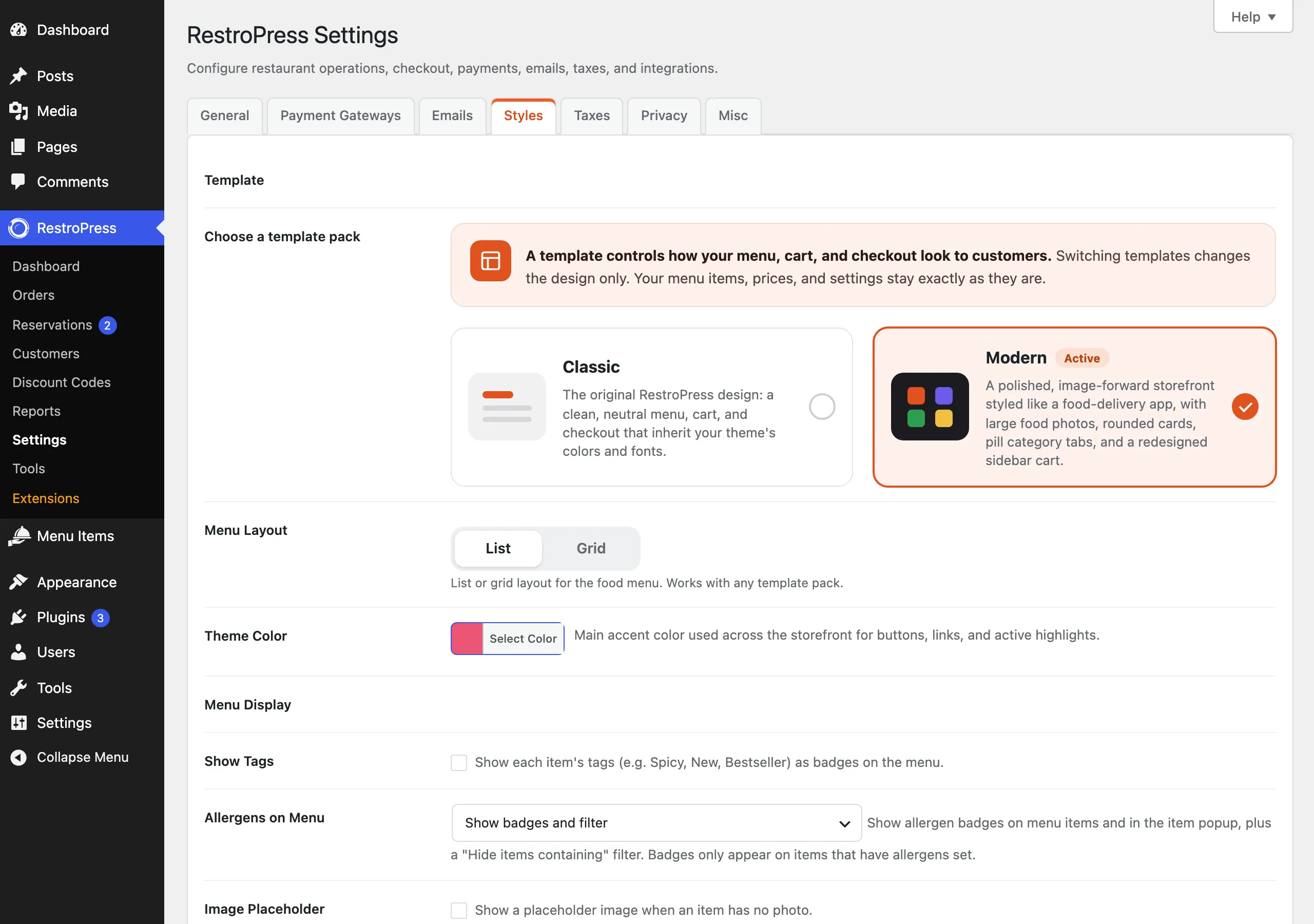
Allergens work as soon as you update. The display setting is Allergens on Menu at RestroPress › Settings › Styles › General, in the Menu Display group, right after Show Tags. It has three choices:
- Show badges and filter (default): badges on menu items and in the item popup, plus the filter.
- Show badges only: badges and popup list, no filter.
- Hide: nothing allergen-related is shown to customers.
Nothing appears on the menu until you assign allergens to items. Badges only show on items that have allergens set, and the filter only appears once at least one published item has an allergen set under Contains.
Set it up#
The allergen list#
The first time RestroPress loads after the update, it creates the 14 allergens below. Each has a short badge code. Manage them at Menu Items › Allergens.
| Allergen | Badge |
|---|---|
| Celery | CE |
| Cereals containing gluten | GL |
| Crustaceans | CR |
| Eggs | EG |
| Fish | FI |
| Lupin | LU |
| Milk | MI |
| Molluscs | MO |
| Mustard | MU |
| Tree nuts | NU |
| Peanuts | PE |
| Sesame | SE |
| Soya | SO |
| Sulphites | SU |
You can rename, edit or delete any of them, and add your own with Add New Allergen. Deleted allergens are not brought back later. The list is created only once.
Each allergen has a Badge code field: one to three letters (letters and numbers only, saved in capitals) shown in the round badge on the menu, for example MI for Milk. If you leave it empty, the first two letters of the name are used. The list screen has a Badge column showing the code in use.
Assign allergens to a menu item#
- Open the menu item in the editor.
- In the Allergens section, choose the allergens in Contains. This list is shown on the menu and in the item popup, and feeds the filter.
- Optionally choose allergens in May contain traces of for a cross-contamination warning. Use the Manage allergens link there if you need one that is not in the list.
- Update the item.
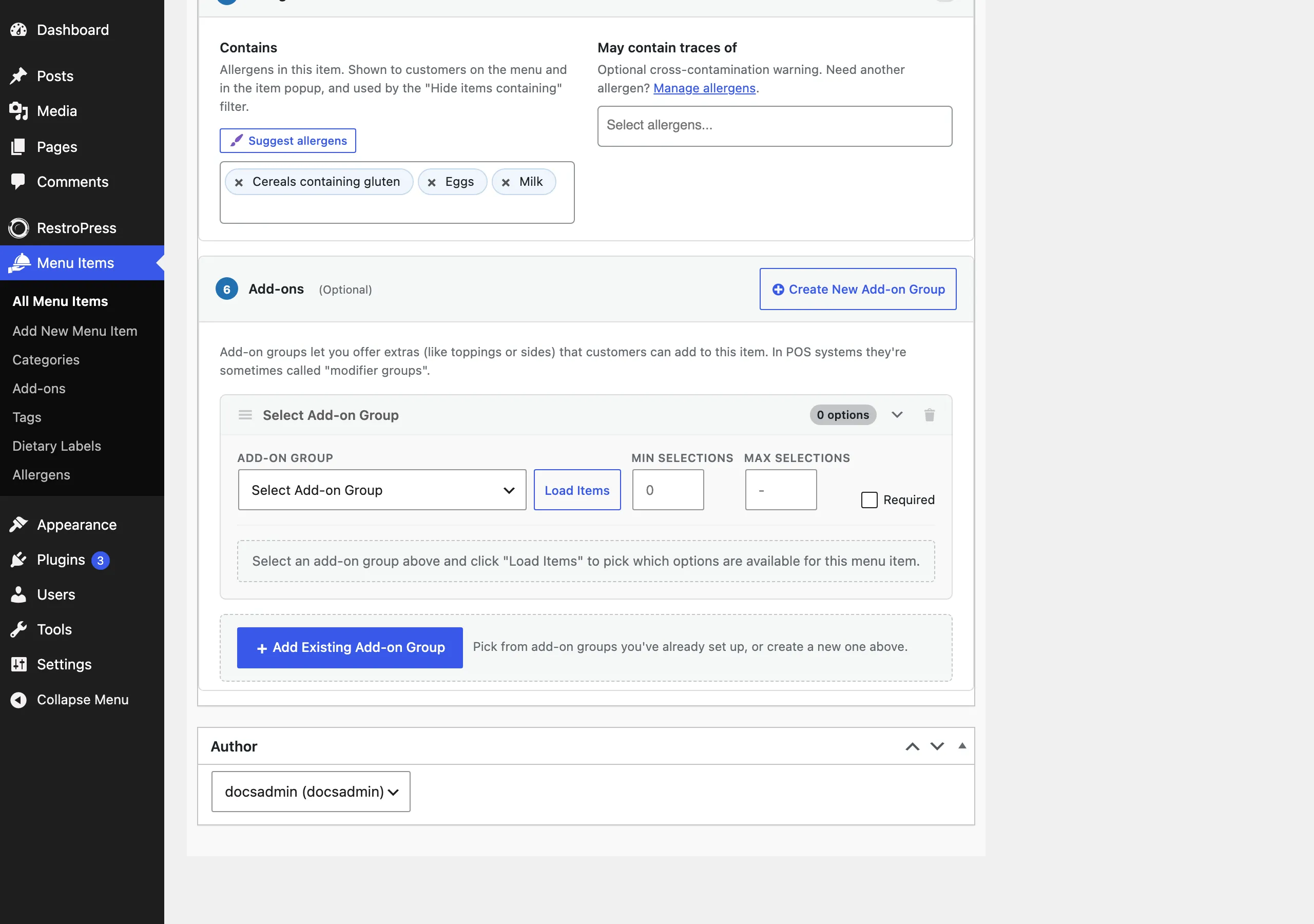
The Allergens section sits after Category, Tags & Dietary and before Add-ons. It shows a count next to its heading when the item has allergens under Contains. Both lists are searchable multi-selects. An allergen chosen under Contains is not shown again as a trace.
How it works#
On the menu#
Each menu item shows a badge for every allergen it contains, followed by badges for traces, right after its dietary labels. Hovering a badge shows the full allergen name, and screen readers read "Contains: ..." and "May contain traces of: ...". Trace badges look different from contains badges. In the Modern pack the badges are in the card's badge row.
In the item popup#
When a customer opens an item, the popup starts with an allergen block: a Contains list and a May contain traces of list with the full names, then a note: "Allergen information is provided by the restaurant. If you have a severe allergy, please contact us before ordering."
The Hide items containing filter#
With Show badges and filter, an Allergens button appears next to the menu search. Opening it shows Hide items containing with one button per allergen. Customers tick the allergens they want to avoid and matching items disappear from the menu. A category heading is hidden when all its items are hidden. A count on the button and a line such as "3 items hidden" show how many allergens and items are affected. Clear removes the filter.
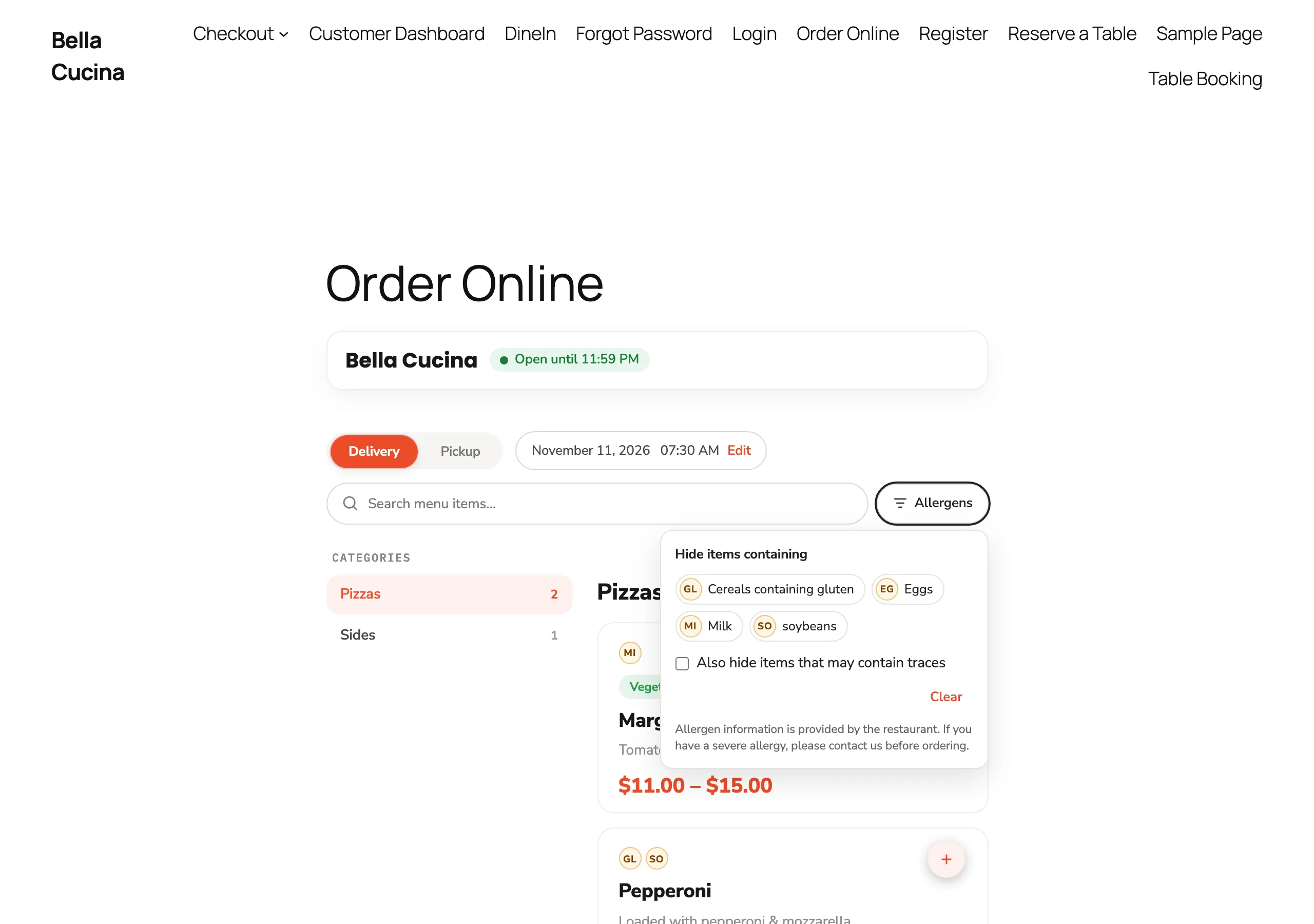
- Also hide items that may contain traces extends the filter to items with a "May contain traces of" match.
- The filter lists only allergens that at least one published item has under Contains.
- The filter works together with the menu search.
- On phones the panel opens as a bottom sheet.
Good to know#
- The filter only hides items that have the allergen recorded. An item with no allergens set is never hidden, so incomplete data can show an item as safe when it is not. Fill in every item before you turn the filter on for customers.
- The customer's filter choices are remembered in their browser, so the menu stays filtered the next time they visit on the same device.
- The filter hides items on the page. It does not remove anything already in the cart.
- Allergen information is entered by you. RestroPress does not check it, and the customer-facing note says the information comes from the restaurant.
- Allergen badges and the filter use the allergens taxonomy only for menu items. They are not offered for add-ons.
- Nutrition facts and printable allergen sheets are not part of this feature. They belong to the separate Allergen & Nutrition extension.
- Menu item API responses include
allergensandallergen_tracesarrays with id, slug, name and code.
For developers#
| Name | Type | Purpose |
|---|---|---|
rpress_allergen | taxonomy | The allergens, attached to fooditem. Badge code is term meta rpress_allergen_code. |
_rpress_allergen_traces | post meta | Array of allergen term IDs stored as "May contain traces of". |
allergens_display | option | Display mode: all, badges or off. |
rpress_allergen_taxonomy_args | filter | Arguments used to register the taxonomy. |
rpress_default_allergens | filter | The seeded allergen list (slug, name, code). |
rpress_allergens_display_mode | filter | Override the display mode. |
rpress_fooditem_allergens | filter | Allergens an item contains. |
rpress_fooditem_allergen_traces | filter | Allergens an item may contain traces of. |
rpress_allergen_code | filter | Badge code for an allergen. |
rpress_allergen_badges_html | filter | The badge markup for card or popup. |
rpress_allergens_any_assigned | filter | Whether the allergen stylesheet loads. |
rpress_fooditem_after_badges | action | Fired by the Modern list card with the item ID; allergen badges hook here. |
rpress_fooditem_section_after_category | action | The editor hook the Allergens section uses; other sections can use it too. |
rpress_get_fooditem_allergens() | function | Allergen terms an item contains. |
rpress_get_fooditem_allergen_traces() | function | Allergen terms for traces, minus those it contains. |
rpress_get_allergen_badges_html() | function | Badge markup for an item, context card or popup. |