
RestroPress Paytm Gateway
On this page
RestroPress Paytm Gateway adds one payment method, Paytm UPI, to RestroPress checkout. In its default mode it uses the Paytm Payment Gateway APIs: the plugin creates a Paytm transaction, sends the customer to the Paytm app or to Paytm hosted checkout, and then confirms the result with Paytm's transaction status API before the order is placed. A second mode, UPI Link Fallback, shows a UPI link and QR code for a normal Paytm merchant UPI ID and relies on the customer to confirm that they have paid. It is meant for restaurants in India that take payments in INR.
This is the fuller of the two Paytm plugins. The other one, restropress-paytm-payment-gateway, is a much smaller plugin that registers a gateway called "Paytm" and has no transaction-token flow, no status API check, no scheduled retries and no UPI fallback.
Requirements#
- RestroPress (the plugin header sets
Requires Plugins: restropress). If RestroPress is not active the plugin shows an admin notice and does nothing else. - WordPress 5.8 or later and PHP 7.4 or later (from the plugin header).
- Store currency set to INR. At checkout the plugin refuses any other currency with the message "UPI payments require INR currency."
- For Paytm PG Auto Verify mode: a Paytm merchant account with a Merchant ID (MID) and a 16-character Merchant Key, plus the Website Name and channel IDs shown in your Paytm dashboard.
- For UPI Link Fallback mode: a Paytm merchant UPI ID, for example
merchant@paytm.
Installation#
- Go to Plugins › Add New › Upload Plugin, choose the ZIP and install it.
- Activate RestroPress Paytm Gateway. On activation the plugin writes default values for its settings (see the table below).
- Open RestroPress › Settings › Payment Gateways, tick Paytm UPI in the list of gateways and save.
- Open the Paytm Gateway section on the same screen and enter your credentials. The Plugins screen also gets a Settings link that opens this section.
The plugin contains no licence field, so there is no licence key to enter and no update checker in its code.
Settings#
All settings are in RestroPress › Settings › Payment Gateways › Paytm Gateway. Until credentials (or, in fallback mode, a UPI ID) are saved, an admin notice reminds users with the manage_shop_settings capability to configure the plugin.
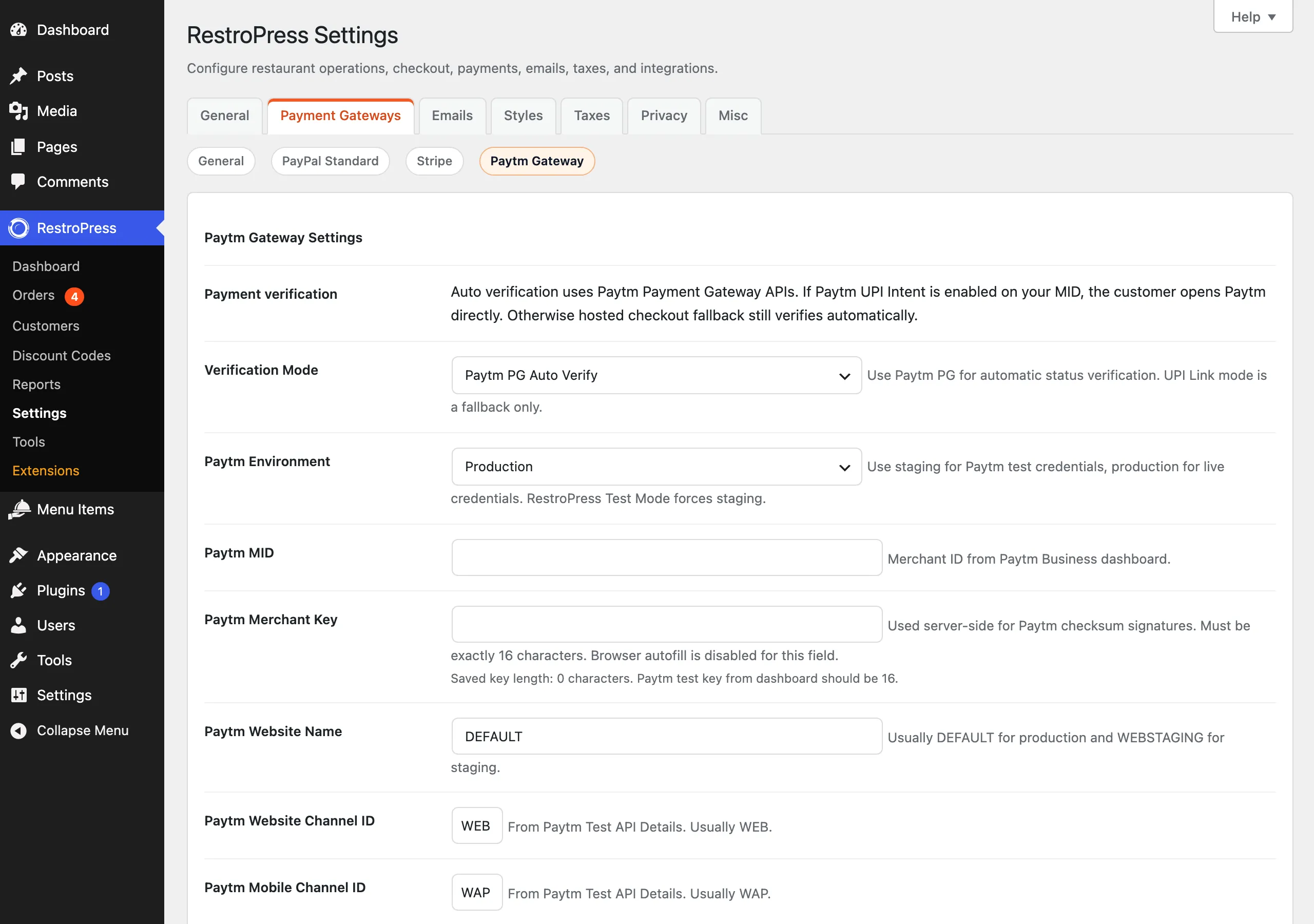
| Setting | What it does | Default |
|---|---|---|
| Verification Mode | "Paytm PG Auto Verify" uses the Paytm APIs and confirms payments automatically. "UPI Link Fallback" skips the Paytm APIs and shows a UPI link. | Paytm PG Auto Verify |
| Paytm Environment | Production or Staging. Use Staging with Paytm test credentials. If RestroPress Test Mode is on, staging is used regardless of this setting. | Production |
| Paytm MID | Merchant ID from the Paytm Business dashboard. | empty |
| Paytm Merchant Key | Used server-side to sign requests. Whitespace is stripped when saved. It must be exactly 16 characters; otherwise checkout stops with an error that shows the saved length. | empty |
| Paytm Website Name | Sent to Paytm as websiteName. Usually DEFAULT for production and WEBSTAGING for staging. If the value is empty, or is the staging value while on production (or the production value while on staging), the plugin substitutes the correct one for the current environment. | DEFAULT |
| Paytm Website Channel ID | Channel ID used for desktop visitors. Only WEB or WAP are accepted; anything else falls back to WEB. | WEB |
| Paytm Mobile Channel ID | Channel ID used when the visitor is on a mobile device in production. Only WEB or WAP are accepted; anything else falls back to WAP. | WAP |
| Paytm Hosted Fallback | Described as sending the customer to Paytm hosted checkout when UPI Intent is not enabled. In this version nothing reads the setting: the hosted checkout page is always used in Paytm PG Auto Verify mode, so changing it has no effect. | On |
| Payee Name | Name shown inside UPI apps. Uses the site name when empty. Applies to the UPI link and QR code. | empty (site name) |
| Merchant Category Code | Optional UPI mc parameter. Digits only, cut to four. | empty |
| Paytm UPI ID | Used only in UPI Link Fallback mode, for example merchant@paytm. | empty |
| Payment Note | Text sent as the UPI note. Tags: {order_id}, {site_name}. Cut to 80 characters. | Order {order_id} - {site_name} |
| Require UPI Reference | Fallback mode only. Makes the transaction/reference ID field mandatory on the payment page. | Off |
| Show QR Code | Shows a QR code on the payment page. | On |
| Customer Instructions | Text shown on the UPI payment page. | Complete payment in your UPI app. The order updates after automatic gateway verification. |
| Implementation Docs | A list of links to Paytm and UPI documentation. Not a setting. | - |
Not every field applies in both modes. The UPI ID, Require UPI Reference, QR code, Payee Name, Merchant Category Code and Payment Note feed the UPI link page that is used in fallback mode (and, see below, also appears after a PG checkout).
How it works#
Paytm PG Auto Verify mode#
- The customer chooses Paytm UPI at checkout and places the order. The plugin checks that credentials are present, the key is 16 characters and the currency is INR.
- RestroPress creates the order with payment status
abandoned. The plugin holds the restaurant side of the order: it sets the order status tocancelledwithout firing the normal order events and cancels the auto-accept timer, so the restaurant is not notified about an unpaid attempt. A note "Order is held until Paytm PG confirms a successful payment." is added to the order. - The plugin calls Paytm's
initiateTransactionAPI with the order IDRP<payment id>and a callback URL on your site, receives a transaction token, and stores it with the order. If Paytm returns an error, checkout is sent back with Paytm's message. - The customer lands on a "Redirecting to Paytm" page. On a mobile device in production it offers the Paytm app (an Android intent link or the
paytm://merchantpaymentlink on iOS) plus a web checkout button. On desktop it loads Paytm's checkout script for your MID and offers "Retry Paytm Checkout" and "Open Paytm Secure Page" buttons. The cart is emptied at this point. - Paytm returns the customer to your site (
?rppg_paytm_callback=1&payment_id=...). The plugin checks the callback checksum when Paytm sends one, then asks Paytm's order status API for the real result. A successful result sets the payment topublish, moves the order status topendingso the restaurant sees it, stores the Paytm transaction ID and adds a note "Paytm PG verified payment automatically." A failed result marks the paymentfailedand sends the customer to the failed-transaction page. A pending result keeps the order held. - If the status is still unknown, the plugin schedules three WP-Cron checks at 2, 5 and 15 minutes. The success page shows "Your Paytm payment is being verified" and reloads every 8 seconds until the payment is final.
If the status API is unreachable or pending but the callback itself carried a valid success, the plugin uses the callback result and adds a note saying so. In staging, and only while RestroPress Test Mode is also on, a pending or unavailable status is treated as success so test orders can be placed (this can be switched off with the rppg_paytm_auto_complete_staging_payment filter).
UPI Link Fallback mode#
- The order is created as
pendingand the customer is sent to a plugin payment page that shows the amount, payee, UPI ID, optional QR code, "Open Paytm UPI", "Open any UPI app" and "Copy UPI link" buttons, and a field for the UPI transaction/reference ID. - When the customer presses I have paid, the plugin stores the reference (if given), adds a note "Customer marked UPI payment as paid", sets the payment status to
processingand the order status topending. Nothing is checked with Paytm, so the restaurant must confirm the money has arrived.
The QR code image is generated by an outside service (api.qrserver.com), so the UPI link, including the UPI ID, is sent to that service whenever the QR code is shown.
Developer reference#
| Hook | Type | Parameters | Purpose |
|---|---|---|---|
rppg_paytm_host | filter | $host, $environment | Change the Paytm API host (default https://secure.paytmpayments.com, staging https://securestage.paytmpayments.com). |
rppg_paytm_checkout_host | filter | $host, $environment | Change the hosted checkout host (default https://securegw.paytm.in, staging https://securegw-stage.paytm.in). |
rppg_paytm_channel_id | filter | $value, $use_mobile_channel | Override the channel ID sent to Paytm. |
rppg_paytm_psp_app | filter | $app, $gateway_id | Override the PSP app name (default Paytm). |
rppg_paytm_android_intent_link | filter | $link, $order_id, $txn_token, $amount | Change the Android intent link. |
rppg_paytm_auto_complete_staging_payment | filter | $enabled, $payment_id | Return false to stop staging payments being auto-completed in Test Mode. |
rppg_paytm_verify_payment | action | $payment_id, $attempt | Scheduled status check. The plugin also listens to older prefixed versions of this event. |
// Never auto-complete Paytm staging payments, even in RestroPress Test Mode.
add_filter( 'rppg_paytm_auto_complete_staging_payment', '__return_false' );Troubleshooting#
- "Paytm PG auto-verification credentials are not configured. Please contact the store." The MID or Merchant Key is empty while Verification Mode is Paytm PG Auto Verify.
- "Paytm Merchant Key must be exactly 16 characters..." Paste the key again from the Paytm dashboard; the settings field shows the saved length.
- "UPI payments require INR currency." Set the store currency to INR under the RestroPress general settings.
- "... UPI ID is not configured." Fallback mode is on but Paytm UPI ID is empty.
- Paytm API errors ending in the result code and environment. For result codes 00000900, 2005 and 2006 the message adds "Check Paytm MID, merchant key, website name, environment, and Paytm account activation." Staging credentials only work with Environment set to Staging (or RestroPress Test Mode on).
- "Paytm checksum verification failed." The callback carried a checksum that does not match your Merchant Key.
- Order stays unpaid after the customer paid. Check the order notes and the RestroPress gateway error log (the plugin records Paytm errors there against the order). The plugin retries the status check three times through WP-Cron, so a site where WP-Cron does not run will not retry.
Changelog highlights#
- 1.0.7: fixed fatal conflicts when the Paytm and PhonePe gateways are active together; settings callbacks and constants are scoped to Paytm.
- 1.0.6: standardised plugin metadata, safe migration from earlier option prefixes, pending callbacks and cron jobs preserved, scheduled checks cleared on deactivation.
- 1.0.5: staging auto-completion now only runs while RestroPress Test Mode is on; live payments always need Paytm verification.