
Slot Limit
On this page
RestroPress Slot Limit caps how many items from one menu category can be ordered for each time slot. It is meant for kitchens with a bottleneck on one kind of food, for example pizzas from a single oven. Customers see how many items are still available next to each time slot, and checkout is blocked when the cart holds more items of that category than the slot has left.
The limit counts items (cart quantity), not orders, even though the settings screen says "orders". It applies to one category only, selected in the settings. Other categories are never counted or restricted.
Requirements#
- RestroPress. The readme lists the highest tested version as 3.2.8.8, and the plugin hooks into the service-time filter
rpress_store_delivery_timings_slot_remaining, which RestroPress 3.4.11 still provides. - WordPress 4.0 or higher and PHP 5.4 or higher, as stated in the readme.
- At least one menu category (taxonomy
food-category) with menu items in it. - Customers must choose a service date and time (the delivery or pickup time selector). If the service time is hidden, for example by the Order Time, Intervals & Limits extension, the limit is not enforced.
Installation#
- In WordPress go to Plugins › Add New › Upload Plugin, choose the extension ZIP and click Install Now.
- Click Activate.
- Open RestroPress › Settings › General. A new Slot Limit section appears there.
This plugin has no licence field and no update checker in its code, so there is no licence key to enter. Update it by uploading a newer ZIP.
Settings#
All settings are under RestroPress › Settings › General › Slot Limit, in a block titled Order Slot Limits.
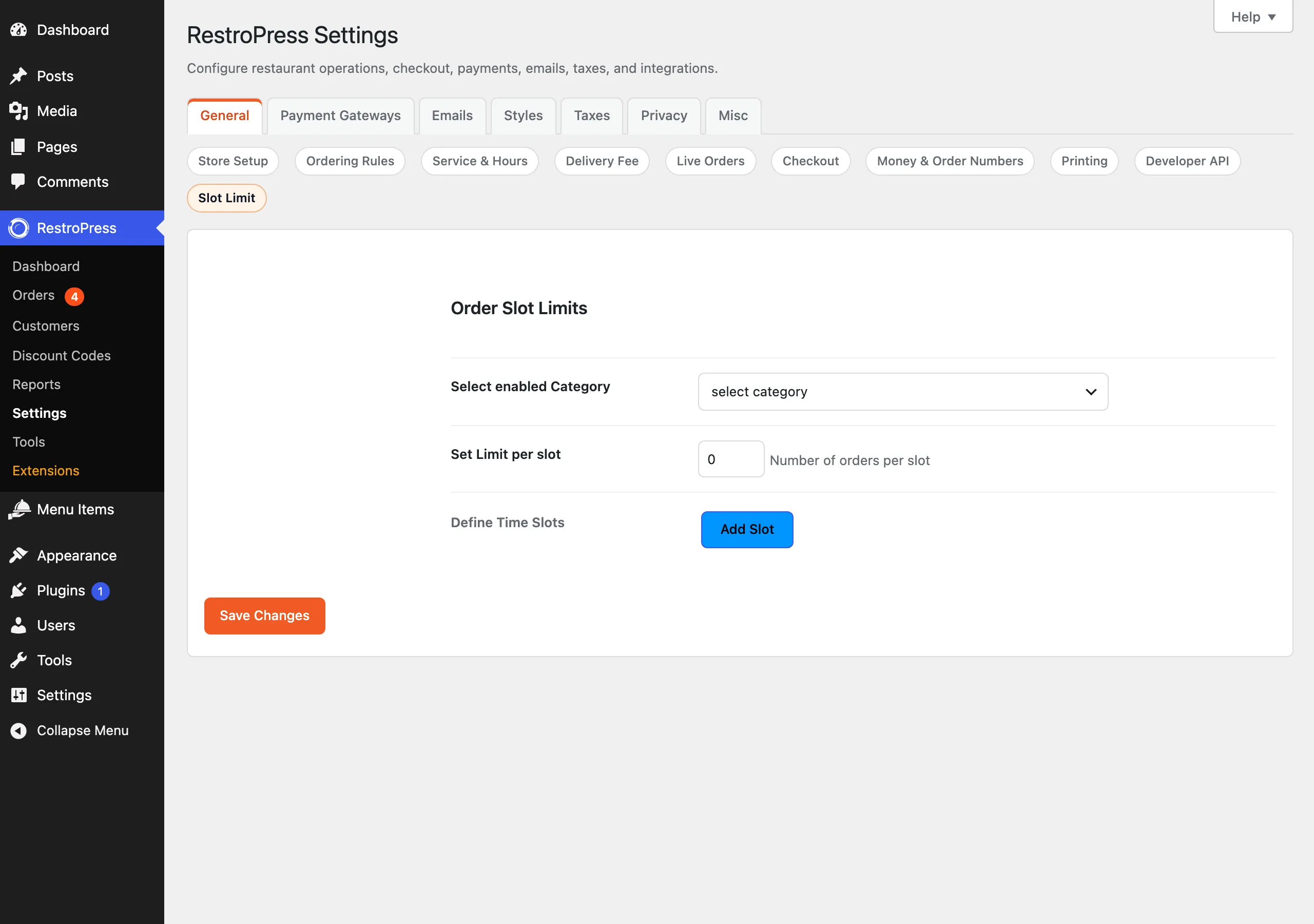
| Setting | What it does | Default |
|---|---|---|
| Select enabled Category | The menu category whose items are limited. Lists every food-category term. The limit is switched off while this is left on "select category". | None |
| Set Limit per slot (Number of orders per slot) | The default maximum number of items from the chosen category per slot. Used for any selected time that does not fall inside a slot defined below. A value of 0 switches the feature off. | 0 |
| Define Time Slots | Optional time ranges with their own limit. Use Add Slot to add a row and Remove Slot to delete one. Each row has Start Time, End Time and Slot Limit. | No rows |
Time slot rows#
- Start Time and End Time are plain text fields. Enter times such as
6:00 PMor18:00. The code accepts the formatsg:i A,g:iA,h:i A,h:iA,H:iandH:i:s, and falls back to PHP date parsing. - A selected time belongs to a row when it is at or after the start and before the end. If the end time is not later than the start, the range is treated as overnight (for example 22:00 to 02:00).
- Slot Limit is the maximum number of category items for that range. Orders for every time inside the range are added together, so a range of 18:00 to 20:00 shares one pool across all the time options inside it.
- If a row has a blank start or end time when saved, it is dropped.
- The first matching row wins. Times outside every row use the default limit from Set Limit per slot.
- If you save with no rows, only the default limit applies and the pool is counted per exact selected time.
How it works#
On the storefront#
- When RestroPress builds the list of available delivery or pickup times, the extension appends the remaining quantity to each time, for example
7:00 PM (4 Pizza Remaining). The word after the number is the name of the selected category. The remaining number is the slot limit minus the items of that category already ordered for the same date, service type and slot, never below 0. - The suffix is only a label. The extension strips it from posted values and from the
service_timecookie, in PHP and in JavaScript, so RestroPress validates and stores the plain time. - When the customer proceeds to checkout (and again when the checkout form is validated) the extension adds up the quantity of category items in the cart. If it is larger than what is left in the selected slot, checkout is stopped with this message: "This time slot is unavailable for the quantity you ordered. We currently have N items remaining. Please adjust your order or select another time slot."
What is counted#
- Orders (
rpress_payment) whose status ispublish,processingorpending, with the same_rpress_delivery_dateand_rpress_delivery_type(delivery or pickup) as the customer's selection. - Within those orders, the quantity of cart items that belong to the selected category.
- Delivery and pickup are counted separately. The service type defaults to delivery when the cookie is missing, and the date defaults to today.
In the admin#
The extension adds no order screen, report or email. It only reads existing orders. Changing an order's status or deleting it changes the counts the next time the page is built.
Developer reference#
| Hook | Type | Parameters | Purpose |
|---|---|---|---|
rpress_get_sl_settings | filter | $rpress_sl_settings | Change the saved settings array (category, ord_per_slot, slots) before use. |
rpress_slot_limit | filter | $rpress_slot_limit | Change the field definition registered in the General settings tab. |
The settings are stored in the option rpress_sl. Example, forcing a lower limit on weekends:
add_filter( 'rpress_get_sl_settings', function ( $settings ) {
    if ( in_array( wp_date( 'N' ), array( '6', '7' ), true ) ) {
        $settings['ord_per_slot'] = 5;
    }
    return $settings;
} );Troubleshooting#
- No "Remaining" text on the time slots. Check that a category is selected and the default limit is above 0. The label is also skipped when the service time is hidden, or when the time cannot be parsed.
- A slot shows 0 remaining but the customer picked it anyway. The slot stays selectable. The check happens at checkout, where the message above is shown. Pick another time or reduce the quantity.
- Other categories are not limited. Only the single selected category is counted.
- Counts look wrong after changing slot rows. Counts are grouped by the configured ranges, so old orders are regrouped under the new ranges.
- Time slots accept any text. The fields are not validated when typed. If a time cannot be parsed, that row never matches and the default limit is used.
Changelog highlights#
- 1.0.6 (2026-07-01): text domain changed to
rpress-slot-limitto avoid a clash with the Order Time, Intervals & Limits extension. - 1.0.5: remaining-slot labels are normalised before RestroPress validates or stores the selected service time.
- 1.0.4: fixed compatibility so remaining labels do not break service time validation, and category counts now cover the whole configured slot range.