
RestroPress Pickup Discount
On this page
Pickup Discount gives customers an automatic discount, with no coupon code, when they order with one chosen service type. Despite the name you can set the service to Pickup or Delivery. It is meant for stores that want to encourage pickup orders (or delivery orders) with a percentage or flat reduction.
Requirements#
- RestroPress, installed and active. If it is not active the plugin shows an error notice and deactivates itself. No minimum RestroPress version is checked in the code; version 1.0.3 of the extension mentions compatibility with RestroPress 3.2.
- The readme lists WordPress 4.0 as the minimum and 7.1 as the version it was tested up to.
Installation#
- In Plugins › Add New › Upload Plugin, choose the ZIP file and select Install Now.
- Select Activate.
- Open the settings from the Settings link on the Plugins screen, or go to RestroPress › Settings › General › Discount Fee.
This plugin has no licence key field and no update checker of its own.
Settings#
Settings are in RestroPress › Settings › General › Discount Fee. Click the normal save button on that settings screen to store them.
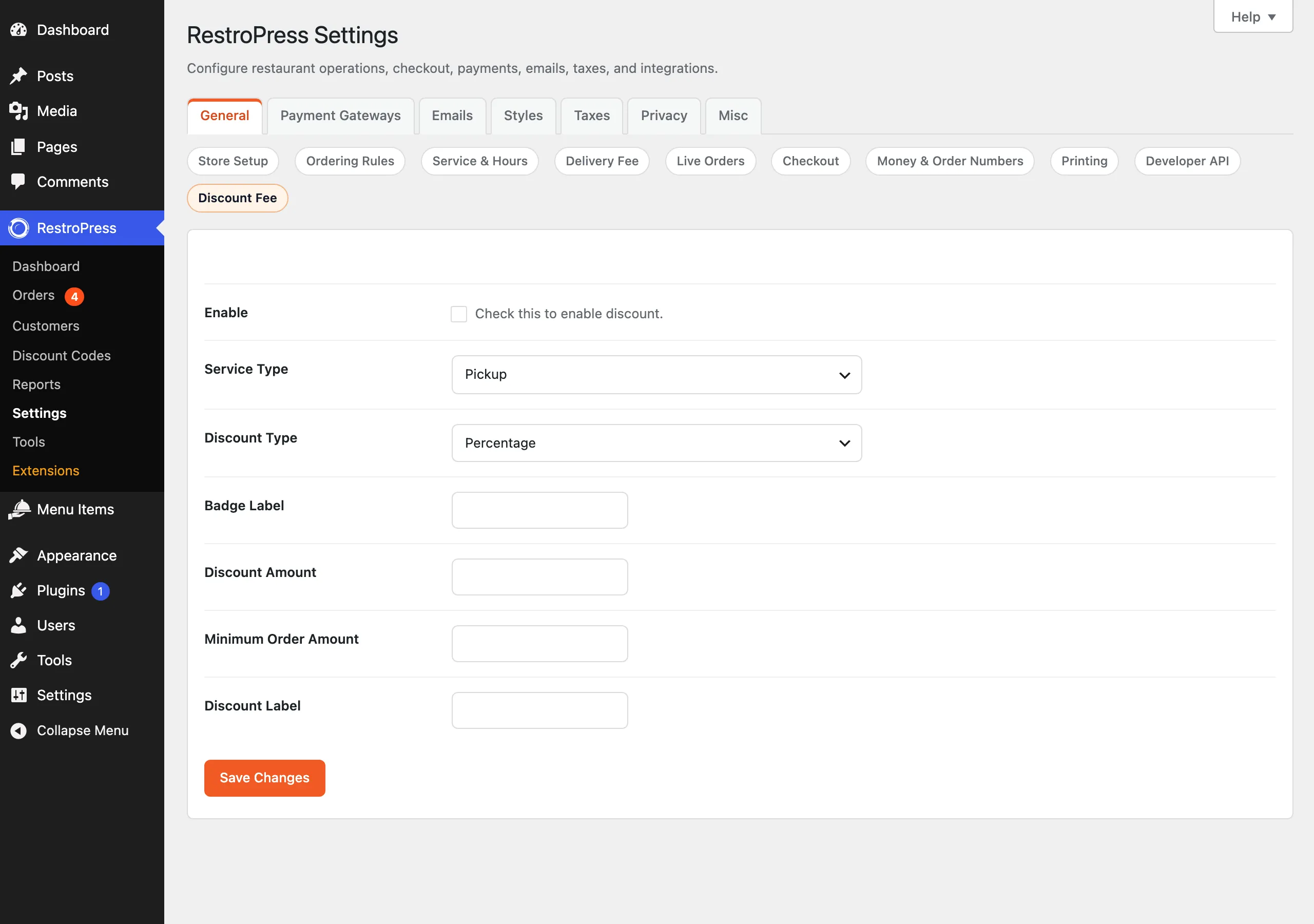
| Setting | What it does | Default |
|---|---|---|
| Enable | Checkbox "Check this to enable discount." Turns the discount on. | Off |
| Service Type | The service the discount applies to: Pickup or Delivery. Only one can be chosen. | Pickup |
| Discount Type | Percentage or Flat. | Percentage |
| Badge Label | Text shown after the amount on the badge on the service tab, for example "off" gives "10% off". If empty, "Discount" is used. | Empty |
| Discount Amount | The percentage, or the currency amount for Flat. Must be above zero for a discount to apply. | Empty |
| Minimum Order Amount | The cart subtotal must reach this amount before the discount applies. 0 means no minimum. | Empty (no minimum) |
| Discount Label | Name of the discount line in the checkout cart and on the receipt. If empty, "Special Discount" is used. | Empty |
Values are stored in a single WordPress option named rp_discount, not in the normal RestroPress settings array.
How it works#
Customer side#
- The service tab for the chosen service type shows a badge such as "10% Discount" (or the flat amount) next to the service name. The badge appears while the discount is enabled and the amount is above zero.
- When the customer has selected that service (read from the
service_typecookie) and the cart subtotal meets the minimum, the cart total is reduced. - A percentage discount is a percentage of the cart subtotal. A flat discount is the amount you set, never more than the subtotal. The total never goes below zero.
- The checkout cart table shows a line with the discount label and the discount amount.
Restaurant side#
For existing orders, the extension adds a fee entry with the discount label to the order's fee list when the order's service type matches and its subtotal meets the minimum. This is calculated again from the current settings each time the fees are read, not saved when the order is placed.
Developer reference#
| Name | Type | Parameters | Purpose |
|---|---|---|---|
rpress_get_discount | filter | $settings (array) | Filters the saved rp_discount settings before they are used. |
RP_Discount_Code::rpress_discount_options() | static method | none | Returns the current settings array. |
// Switch the discount off on Sundays
add_filter( 'rpress_get_discount', function ( $settings ) {
    if ( 'Sun' === wp_date( 'D' ) ) {
        $settings['enable'] = '';
    }
    return $settings;
} );Troubleshooting#
- No discount shows. Check Enable, that Discount Amount is above zero, that the customer has chosen the configured service type, and that the subtotal meets the Minimum Order Amount.
- No badge on the service tab. The badge is matched against the service name in lower case ("pickup" or "delivery"). If you renamed the services or a translation changes the label, the badge may not appear.
- Settings do not save. They are saved when the General settings are saved by a user who can manage shop settings.
- Plugin deactivated itself. It deactivates when RestroPress is not active.
Changelog highlights#
- 1.0.5: fixed the badge alignment in the service selector; improved badge markup; sanitisation and calculation clean-up; removed an unused frontend script.
- 1.0.4: fixed a checkout page design issue.
- 1.0.3: RestroPress 3.2 compatibility fix.